A portable monitor can expand your workspace, but the wrong stand can add bulk, wobble, and setup frustration to every trip. The best monitor arms for travel balance stability with a compact, packable design.
We’ve gathered 10 portable options across magnetic, clamp, tripod, and VESA-compatible formats to help you choose a travel-ready mount for your screen, tablet, or hybrid workstation.
Best 10 Monitor Arms for Travel Picks for 2026
Best Magnetic 2-in-1 Pick

- Magnetic and VESA 75x75mm mounting
- Folds compactly for backpacks
- Supports up to 4.4 pounds
Best For: Travelers switching between monitors and tablets
Best Higher-Capacity Clip Stand
Adjustable Foldable Monitor Holder

- Supports up to 6.5 pounds
- 360-degree rotation and two adjustable arms
- Expandable desktop clip
Best For: Travelers using compatible desk-edge mounting points
Best Tool-Free Heavy-Duty Pick
Jakeko Magnetic VESA Travel Arm

- Magnetic and VESA 75x75mm mounting
- Folds flat with a hidden wrench
- Supports screens up to 18.5 inches
Best For: Mobile workstations needing broad compatibility
Best Ergonomic Magnetic Stand

- Raises screens up to 13 inches
- Three mounting solutions
- Foldable aluminum construction
Best For: Travelers prioritizing ergonomic viewing height
Best Ultra-Portable Pick
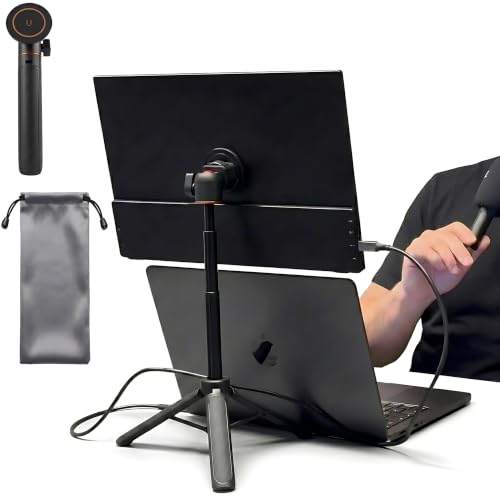
- Weighs only 0.5 pounds
- Collapses to 8.3 inches
- Height adjusts to 19.7 inches
Best For: Light-pack travelers who want fast, tool-free monitor support
Compact VESA Pick
Aluminum Portable Monitor Stand

- 75x75mm VESA compatibility
- 360-degree rotating aluminum base
- Supports monitors up to 10 lb
Best For: Travelers with smaller 75x75mm VESA monitors
Magnetic Travel Option

- VESA and magnetic mounting plates
- 360-degree rotation with foldable arm
- Supports devices up to 4.4 lb
Best For: Tool-free desk, nightstand, and coffee-table setups
Best Magnetic 2-in-1 Pick – Foldable Magnetic Monitor Arm
For shoppers comparing monitor arms for travel, this aluminum model stands out for its magnetic and VESA 75x75mm mounting options. It folds compactly, supports up to 4.4 pounds, and is designed for portable monitors and tablets from 4.7 to 18.5 inches.
Best For: Travelers who switch between a portable monitor and tablet and want tool-free adjustment.
Pros:
- Combines magnetic and VESA 75x75mm mounting in one stand.
- Folds nearly flat and uses a lightweight aluminum-alloy construction.
- Offers 360-degree rotation, adjustable positioning, and built-in cable management.
Cons:
- Load capacity is limited to 4.4 pounds.
- Magnetic mounting may require the included metal sheet for some devices.
This is a practical choice for mobile workspaces where portability and flexible device compatibility matter more than supporting a heavier display.
Best Higher-Capacity Clip Stand – Adjustable Foldable Monitor Holder
This clip-style holder is a straightforward option among monitor arms for travel, with two adjustable arms, 360-degree rotation, and a capacity of up to 6.5 pounds. Its expandable clip fits desktops from 4.9 to 10.2 inches wide and accommodates screens under 17.3 inches.
Best For: Users who prefer a clamp-style tabletop stand with a higher stated load capacity.
Pros:
- Supports up to 6.5 pounds, more than the other listed stands.
- Adjustable, foldable, and rotatable for flexible positioning.
- Aluminum construction and an anti-slip base pad help provide stable tabletop use.
Cons:
- At 1.5 pounds, it is not the lightest option for travel.
- Joint tension may require screwdriver adjustments.
- Its clip requires a compatible desk edge between 4.9 and 10.2 inches.
Choose this model if desk compatibility and load capacity are priorities, but check the clip dimensions before packing it for a mobile setup.
Best Tool-Free Heavy-Duty Pick – Jakeko Magnetic VESA Travel Arm
The Jakeko combines magnetic and VESA 75x75mm mounting with a reinforced base and geared, tool-free adjustments. For monitor arms for travel, its two-stage folding design, hidden wrench, and support for displays up to 18.5 inches make it well suited to changing workspaces.
Best For: Users who want broad screen compatibility, secure positioning, and hand-adjustable joints.
Pros:
- Supports portable monitors and tablets from approximately 8.3 to 18.5 inches.
- Offers magnetic or VESA 75x75mm mounting and multiple 360-degree adjustment points.
- Folds flat and includes cable clips plus a wrench stored in the base.
Cons:
- Maximum supported weight is 4.4 pounds.
- It weighs about 0.8 kg, so it may be less convenient than lighter travel stands.
- It is not compatible with MagSafe.
This is a strong fit for frequent relocations when flexible mounting and adjustment are more important than minimizing every ounce of packed weight.
Best Ergonomic Magnetic Stand – UPERFECT Adjustable VESA Arm
The UPERFECT is designed for travelers who want to raise a portable monitor or tablet to a more comfortable viewing height. It supports up to 4.4 pounds, adjusts up to 13 inches, and provides magnetic, screw-on VESA, or adhesive-plate mounting options.
Best For: Professionals, designers, and students prioritizing adjustable height and ergonomic positioning.
Pros:
- Raises the display up to 13 inches for a higher viewing position.
- Provides three mounting approaches for different device backs and VESA patterns.
- Folds into a low-profile form and includes 360-degree swivel adjustment.
Cons:
- Supports up to 4.4 pounds.
- Some devices may require an adhesive or screw-on metal plate.
- Recommended usage angles should be checked for stable support.
Among monitor arms for travel, this model makes the most sense when ergonomic height adjustment and mounting flexibility are central to your setup.
Best Clamp-On Pick – Foldable Aluminum Monitor Arm
If you want monitor arms for travel that can still support a larger portable display, this clamp-on model offers a useful balance of stability and portability. Its aluminum construction, 360-degree rotating base, and fold-flat design suit desks, nightstands, and other flat surfaces.
Best For: Remote workers, students, and digital nomads carrying a portable monitor or tablet between workspaces.
Pros:
- Supports screens and tablets from 6.5 to 18.5 inches and up to 5.5 pounds.
- 360-degree rotation and adjustable arm make portrait or landscape positioning easy.
- Tool-free clamp fits flat surfaces up to 2.36 inches thick and folds for travel.
- Aluminum body, padded clamp, and cable clip support a tidy setup.
Cons:
- Designed for flat, stable surfaces rather than headboards.
- At 2.4 pounds, it is less pocketable than a compact tripod stand.
This is a strong choice when stability and screen size matter more than minimum packed weight. The higher load capacity is especially useful for larger portable monitors and tablets.
Best Ultra-Portable Pick – Magnetic Monitor Tripod
For monitor arms for travel that prioritize a small packed footprint, this magnetic tripod is easy to carry and quick to deploy. It collapses to 8.3 inches, weighs 0.5 pounds, and uses included plates and rings to attach compatible monitors, tablets, or phones.
Best For: Digital nomads and commuters building temporary monitor setups in coffee shops, airports, or hotel rooms.
Pros:
- Compact 8.3-inch folded size and 0.5-pound weight suit bags and pockets.
- Magnetic mounting supports devices up to 4.4 pounds with included plates and rings.
- Telescopic pole adjusts height up to 19.7 inches.
- Tool-free setup works with displays from 4.7 to 18.5 inches.
Cons:
- The stand’s head does not support rotation.
- Mounting requires attaching a metal plate or ring to the device.
- Tripod legs need to be opened carefully using the base button.
This is the most travel-friendly option of the three, particularly when weight and setup speed are the main concerns. Choose it over a clamp arm if you can accept the added mounting plate and fixed head.
Best Heavy-Duty Pick – Rotating Aluminum Monitor Arm
Among monitor arms for travel, this clamp-mounted arm is aimed at users who want a more permanent-feeling setup without sacrificing portability. It supports screens up to 18.5 inches, rotates 360 degrees, and combines hand-tightened adjustment joints with a sturdy aluminum body.
Best For: Portable-monitor users who need a secure desk-edge mount for coding, digital art, or professional work-from-home setups.
Pros:
- Supports displays from 6.5 to 18.5 inches and up to 4.4 pounds.
- 360-degree rotation supports portrait, landscape, and sharing positions.
- C-clamp fits desks and table edges up to 2.5 inches thick.
- Aluminum construction, padded clamp, and cable clips help protect and organize the workspace.
Cons:
- Some less frequently adjusted joints require the included wrench.
- At 1.1 kilograms, it is not the lightest travel option.
- Its clamp requires a suitable desk or table edge for installation.
This arm makes sense for travelers who move between offices or rooms but still want firm, eye-level support for a larger display. Its hybrid adjustment approach favors secure positioning over the lightest possible pack.
Compact VESA Pick – Aluminum Portable Monitor Stand
For shoppers comparing monitor arms for travel, this tabletop VESA stand offers a compact, freestanding alternative for smaller compatible displays. Its aluminum base rotates 360 degrees and folds a monitor into portrait or landscape orientation when supported by the screen size and mounting pattern.
Best For: Travelers using 7- to 18-inch monitors with 75x75mm VESA holes.
Pros:
- Aluminum construction with a 7.75-by-7.75-inch base.
- Anti-loss M4 screws are designed to remain attached to the bracket.
- 360-degree swivel base and anti-slip feet support flexible desktop positioning.
- Supports screens up to 10 pounds, according to the supplied specifications.
Cons:
- Only fits 75x75mm VESA patterns; it does not fit 100x100mm mounts.
- It is a freestanding stand rather than a clamp-on arm.
- Compatibility requires checking the monitor’s VESA holes, screw standard, size, and weight.
This is a practical choice when your portable monitor has the required 75x75mm pattern and you want a stable, cable-conscious tabletop setup without a complicated installation. Verify compatibility before packing it for a trip.
Magnetic Travel Option – Foldable Portable Monitor Arm
This magnetic arm is one of the more flexible monitor arms for travel, combining a clamp-style installation with VESA and round magnetic mounting plates. The long, foldable arm can position compatible screens beside or above a primary display, then fold away for storage.
Best For: Users who want tool-free positioning for compatible portable monitors, tablets, or e-readers on a flat desk, nightstand, or coffee table.
Pros:
- Offers 360-degree rotation and a foldable long arm.
- Includes both a VESA plate and a round magnetic plate.
- Tool-free adjustment and cable clips help simplify setup.
- Solid aluminum construction supports devices up to 4.4 pounds.
Cons:
- Designed for flat, stable surfaces and is not suitable for headboards.
- Compatibility is limited to devices in the supplied 8.3- to 18.5-inch range and up to 4.4 pounds.
- Magnetic mounting requires careful removal from the bottom side, and tablets may benefit from the included copper sheets.
Choose this model if quick repositioning and compact storage matter more than a conventional fixed mount. The magnetic option adds versatility, but travelers should confirm the surface and device attachment method before relying on it.
Heavy-Duty Foldable Pick – Large Clamp Portable Monitor Stand
For monitor arms for travel that prioritize rigidity, this stand uses a solid die-cast aluminum body, a weighted base, and a clamp-style grip that does not require VESA holes. It folds to about 2.2 inches, making it suitable for a laptop bag, backpack sleeve, or desk drawer.
Best For: Travelers carrying larger portable monitors or tablets who want a stable, freestanding stand with quick height adjustment.
Pros:
- Supports compatible devices from 6.5 to 18.5 inches and up to 4.4 pounds.
- Solid ADC7 aluminum construction is designed to reduce flex and vibration.
- Folds flat to approximately 2.2 inches for easier transport.
- Weighted 1.9-pound base, 360-degree geared rotation, and built-in tool storage add stability and convenience.
Cons:
- The stand itself is relatively substantial because of its weighted base.
- Its supported load is limited to 4.4 pounds.
- Compatibility still depends on the device fitting the adjustable grip and supplied size range.
This is the strongest fit for travelers who value a planted, vibration-resistant setup over the lightest possible carry. Its no-VESA grip and fold-flat design make it broadly useful, while the weighted base may add noticeable packing weight.
How We Picked the Best Monitor Arms for Travel
We focused on the features that matter most when a monitor mount leaves your desk. Each option was evaluated by its attachment method, stated screen-size and weight support, portability, adjustability, and compatibility with common portable-monitor formats.
Magnetic bases can make setup fast, while clamp models generally provide a more secure connection to a suitable desk. VESA compatibility is useful if you want to move between monitors, and tripod-style designs can work well when desk access is limited. Because product specifications vary, confirm your monitor’s weight, mounting pattern, and dimensions before buying.
Quick Comparison
| Mount Type | Best For | Main Advantage | Watch For |
|---|---|---|---|
| Magnetic arm | Fast hotel or office setups | Quick attachment and rotation | Requires a compatible magnetic surface or plate |
| Desk clamp | Stable workstation use | Strong grip and broad support | Needs a suitable desk edge and extra packing space |
| VESA mount | Flexible monitor compatibility | Works with standard mounting holes | Check 75 × 75 mm spacing and screw fit |
| Tripod stand | Desks without clamp access | Independent placement | May take more room on a small surface |
Key Buying Factors for Monitor Arms for Travel
Compatibility and Capacity
Start with screen size, weight, and mounting pattern. A mount rated for a larger display is not automatically suitable if the monitor lacks the correct VESA holes or uses an incompatible magnetic interface. Leave some capacity headroom rather than operating at the maximum stated load.
Packability and Setup
Look for foldable arms, removable clamps, compact bases, and hardware that stays attached or is easy to store. A quick tool-free setup is especially valuable in hotels, coworking spaces, and temporary offices.
Stability and Adjustment
Rotation is useful for portrait documents, coding, and side-by-side viewing, but movement should not cause the screen to sag or vibrate. Consider the desk thickness, base footprint, arm height, and whether cable routing will interfere with positioning.
Materials and Hardware
Aluminum bodies can reduce weight while retaining rigidity. Check included screws, anti-loss hardware, pads, and any required magnetic plates. These small details can determine whether the mount is practical on the road.
Who Should Buy Which Monitor Arms for Travel?
Choose a magnetic model if speed and portability are your priorities and your monitor or setup supports magnetic attachment. Choose a clamp arm if you want stronger desk stability for longer work sessions. Choose a VESA-compatible stand if you use multiple displays or want broader compatibility. Choose a tripod-style stand if you need independent placement or frequently work at desks where clamps cannot attach.
For frequent travelers, the best overall choice is the lightest mount that safely supports your display while fitting your usual work surfaces. Measure both your monitor and your travel bag before ordering.