Portable RAID enclosures are a smart way to add fast, flexible storage without committing to a full NAS or desktop array. They can help with backups, media libraries, and working files when reliability matters.
Below, we’ve grouped the top options for different drive types, bay counts, and speed needs so you can quickly find the right enclosure for your workflow.
Best 10 Portable Raid Enclosures Picks for 2026
Desktop RAID Backup

- USB 3.2 Gen 2 up to 10Gbps
- RAID 0, RAID 1, JBOD, Single
- Tool-free trays with push-lock design
Best For: Fast, simple two-drive RAID and mirrored backup
NVMe Clone Bay

- RAID 0, RAID 1, JBOD, Clone mode
- 20Gbps transfer speed
- Tool-free aluminum compact build
Best For: Portable NVMe RAID plus offline drive cloning
Compact Dual-Bay RAID
CENMATE 2-Bay Aluminum RAID Enclosure

- 2.5/3.5-inch SATA HDD/SSD support
- RAID 0, RAID 1, Normal, and JBOD
- Aluminum build with cooling fan
Best For: Users who need a simple dual-drive RAID enclosure for backup and everyday storage
High-Capacity 5-Bay RAID
Yottamaster 5-Bay RAID DAS Enclosure

- Five bays and up to 120TB capacity
- RAID 0/1/5/10, JBOD, Clone, Normal
- Aluminum chassis with 80mm fan
Best For: Video and backup users who need a larger RAID enclosure with flexible drive modes
Expanded Four-Bay RAID
CENMATE 4-Bay Aluminum RAID Enclosure

- Two 2-bay units combined into one enclosure
- Up to 80TB total capacity
- Aluminum build with dual fans
Best For: Users who need a four-drive RAID enclosure for larger backups and desktop storage
Compact 2-Bay 2.5" RAID
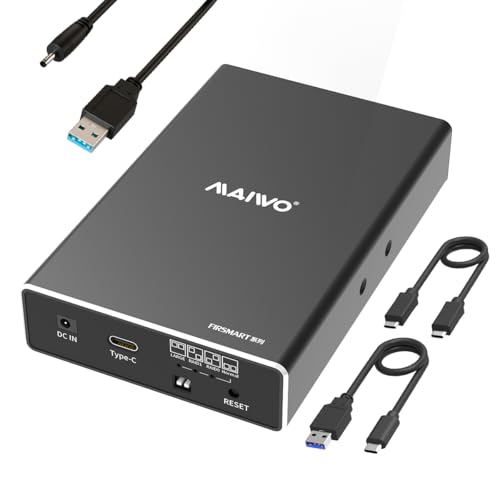
- Fits 2.5-inch SATA SSDs/HDDs
- Up to 10Gbps in RAID 0 mode
- RAID 0/1/JBOD/PM support
Best For: portable 2.5-inch dual-drive storage with fast USB 3.1 performance
High-Capacity 4-Bay Desktop RAID
- Holds up to 80TB across four bays
- Built-in fan and aluminum-alloy body
- RAID 0/1/3/5/10 plus clone modes
Best For: large-capacity external RAID storage with active cooling
Portable 2-Bay 3.5" RAID with Fan

- Supports 2.5-inch and 3.5-inch SATA drives
- Built-in two-speed cooling fan
- RAID 0/1/JBOD/PM modes
Best For: compact RAID storage for 3.5-inch drives with cooling
Desktop RAID Backup – TerraMaster 2-Bay USB 3.2 DAS
If you want portable raid enclosures for a desktop-style backup setup, the TerraMaster D2-320 is built around speed, simple drive access, and multiple hardware RAID options. It uses USB 3.2 Gen 2 for up to 10Gbps connectivity and supports RAID 0, RAID 1, JBOD, and Single, making it a flexible choice for everyday storage or mirrored protection.
Best For: Users who want a 2-bay SATA DAS for fast transfers, RAID flexibility, and straightforward tool-free drive swaps.
Pros:
- USB 3.2 Gen 2 connection with up to 10Gbps transfer speed
- Supports RAID 0, RAID 1, JBOD, and Single
- Tool-free trays with TerraMaster’s push-lock design
- Intelligent temperature-controlled low-noise fan
Cons:
- Diskless, so drives must be purchased separately
- Limited to 2 bays
- It is a DAS, not a NAS
Overall, this is a practical pick if you want a compact RAID enclosure with faster USB performance and mirrored backup support. It suits users who value easy drive handling and solid cooling over network features.
NVMe Clone Bay – NewQ Dual M.2 RAID Enclosure
For portable raid enclosures built around NVMe SSDs, this dual-bay M.2 2280 enclosure focuses on speed, cloning, and flexible drive setups. It supports RAID 0, RAID 1, JBOD, and Clone mode, and its 20Gbps transfer rate makes it a strong fit for moving large files or duplicating drives without a separate dock.
Best For: Users who need a compact dual-NVMe enclosure with offline cloning and fast 20Gbps performance.
Pros:
- Supports RAID 0, RAID 1, JBOD, and Clone mode
- 20Gbps transfer speed for large file workflows
- Tool-free access for quick SSD installation and swaps
- Aluminum body designed for portability and heat dissipation
Cons:
- Built for M.2 2280 NVMe SSDs only
- PC-focused hardware platform
- Requires careful power stability for high-capacity dual-drive use
This enclosure stands out if cloning matters as much as RAID support. It combines a lightweight build with useful dual-drive modes, making it a handy option for mobile SSD workflows.
All-Flash Creator Hub – ORICO 4-Bay 2.5-inch RAID
If you need portable raid enclosures for an all-flash workflow, ORICO’s 4-bay 2.5-inch model is aimed at creators handling video, photography, and large project files. It supports seven RAID modes, includes multiple expansion ports, and is designed around 2.5-inch drives only, which keeps it lighter and more travel-friendly than many 3.5-inch enclosures.
Best For: Video editors and photographers who want a compact all-flash RAID enclosure with built-in expansion ports.
Pros:
- Seven RAID modes including RAID 0, 1, 3, 5, 10, JBOD, and CLEAR
- USB 3.2 Gen 2 support with up to 10Gbps when paired with a PSSD
- Includes extra USB ports plus SD and TF card slots
- All-2.5-inch design keeps it smaller and easier to carry
Cons:
- No support for 3.5-inch drives
- Uses 2.5-inch drives only
- Maximum speed depends on interface and drive type
This is a strong choice when mobility and workflow convenience matter more than raw bulk storage. The built-in ports and broad RAID support make it especially useful for on-location media work.
High-Capacity 3.5-inch RAID – MAIWO Dual Bay SATA Enclosure
Among portable raid enclosures for larger SATA drives, the MAIWO dual-bay unit is built for 3.5-inch HDDs and emphasizes steady power, cooling, and simple RAID choices. It supports RAID 0, RAID 1, JBOD, and NORMAL, and its independent 12V/4A power supply is there to keep dual-drive setups running reliably.
Best For: Users who want a 3.5-inch dual-bay RAID enclosure with dependable power and cooling.
Pros:
- Supports RAID 0, RAID 1, JBOD, and NORMAL
- Independent 12V/4A power supply for stable operation
- Smart temperature-controlled fan for cooling
- Up to 60TB capacity with 3.5-inch drives
Cons:
- 5Gbps USB speed is slower than newer 10Gbps or 20Gbps models
- Designed primarily for 3.5-inch drives
- 2.5-inch drives need a mounting bracket, which is not included
This enclosure makes sense if capacity and drive stability matter more than top-end speed. It’s a straightforward option for users building a robust SATA-based storage setup around larger disks.
Compact Dual-Bay RAID – CENMATE 2-Bay Aluminum RAID Enclosure
If you want portable raid enclosures for a simple two-drive setup, this CENMATE aluminum unit is built for practical desktop storage and backup. It supports 2.5-inch and 3.5-inch SATA HDDs and SSDs, offers RAID 0, RAID 1, Normal, and JBOD modes, and connects through USB 3.0 with A/C cable support.
Best For: Individuals or small teams that need a compact, plug-and-play dual-bay enclosure for backup, mirroring, or striped storage.
Pros:
- Supports 2.5-inch and 3.5-inch SATA HDDs/SSDs with up to 20TB per drive
- Offers four modes: RAID 0, RAID 1, Normal, and JBOD
- Aluminum body and built-in fan help with heat management
- USB 3.0 connectivity with Windows, Mac, and Linux compatibility
Cons:
- Fan noise is listed around 40–50 dB
- MAC OS has no RAID software support noted
- RAID setup warning indicates data loss is possible during configuration
This is a straightforward option if you need an affordable two-bay enclosure that balances flexibility, cooling, and broad OS compatibility. It is best suited to users who value simple external storage over advanced RAID features.
High-Capacity 5-Bay RAID – Yottamaster 5-Bay RAID DAS Enclosure
For buyers comparing portable raid enclosures with more expansion room, the Yottamaster FS5RU3 stands out for its five-bay design and up to 120TB total capacity. It supports 2.5-inch and 3.5-inch SATA HDDs and SSDs, multiple RAID modes, and USB 3.0 connectivity for media-heavy storage needs.
Best For: Video editors, studios, and backup-heavy users who need a larger multi-drive DAS with RAID flexibility.
Pros:
- Five bays with support for up to 120TB total capacity
- Hardware RAID modes include RAID 0, 1, 5, 10, JBOD, Clone, and Normal
- Aluminum enclosure and built-in 80mm fan support cooling
- Removable trays make drive installation and replacement easier
Cons:
- USB 3.0 tops out at 5Gbps, so it is not a high-speed interface upgrade
- Larger size will take more desk or rack-style space than smaller enclosures
- Best fit for users comfortable managing multi-drive storage setups
This is the strongest pick here for capacity and RAID versatility. If you need one enclosure to consolidate large media libraries or archives, the five-bay layout gives you room to scale.
Expanded Four-Bay RAID – CENMATE 4-Bay Aluminum RAID Enclosure
This CENMATE model is a useful pick if you want portable raid enclosures with more drive slots but still prefer a USB-connected desktop device. It combines two 2-bay RAID units into one enclosure, supports 2.5-inch and 3.5-inch SATA HDDs and SSDs, and offers RAID 0, RAID 1, Normal, and JBOD modes.
Best For: Users who want a four-drive enclosure for larger backups, mirrored storage, or organized desktop expansion.
Pros:
- Four-drive design with up to 80TB total capacity
- Supports 2.5-inch and 3.5-inch SATA HDDs/SSDs
- Four RAID modes: RAID 0, RAID 1, Normal, and JBOD
- Aluminum construction with two built-in fans for cooling
Cons:
- Fan noise is listed around 40–50 dB
- MAC OS has no RAID software support noted
- RAID setup carries the usual data-loss warning
This enclosure makes sense when two bays are not enough but you do not want to jump all the way to a five-bay system. It is a practical middle-ground for users who need more local storage with basic RAID options.
Compact 2-Bay 2.5" RAID – MAIWO Dual Bay 10Gbps
If you want portable raid enclosures for 2.5-inch SATA drives, this MAIWO dual-bay model is built for fast, compact storage on the go. It supports RAID 0/1/JBOD/PM, uses USB 3.1 Gen 2, and keeps the footprint small enough for a travel-friendly desktop setup.
Best For: Users who need a compact dual-bay enclosure for 2.5-inch SSDs or HDDs with fast USB 3.1 performance and simple RAID switching.
Pros:
- Supports 2.5-inch SATA SSDs/HDDs with up to 16TB total capacity
- USB 3.1 Gen 2 interface rated up to 10Gbps in RAID 0 mode
- Includes RAID 0, RAID 1, JBOD/LARGE, and NORMAL/PM modes
- Tool-free installation, hot swapping, and aluminum alloy construction
Cons:
- Requires additional power, though a power cable is included
- Limited to 2.5-inch drives only
- Does not include SSDs or HDDs
Overall, this is a practical choice if you want a small dual-drive RAID enclosure with strong speed potential and flexible mode options. Its 16TB ceiling and portable build make it well suited to lightweight backup or mirrored storage setups.
High-Capacity 4-Bay Desktop RAID – CENMATE 80TB Fan-Cooled
Among portable raid enclosures, this CENMATE 4-bay unit is better described as a moveable desktop storage box than a pocket-sized device. It supports both 2.5-inch and 3.5-inch SATA drives, includes a cooling fan, and offers multiple RAID modes for larger capacity storage needs.
Best For: Users who need a high-capacity 4-bay external RAID enclosure for 2.5/3.5-inch drives with active cooling and broader RAID flexibility.
Pros:
- Supports 2.5-inch and 3.5-inch SATA HDDs/SSDs up to 80TB total
- Includes a built-in fan and aluminum-alloy body for heat management
- Offers 8 RAID modes, including RAID 0/1/3/5/10, CLONE, LARGE, and NORMAL
- Comes with USB A/C 3.0 and eSATA cable options
Cons:
- Fan noise is rated around 40–50 dB
- RAID mode switching requires a specific reset procedure and can cause data loss
- USB 3.0 transfer speed is capped at 5Gbps
This enclosure makes sense when capacity and redundancy matter more than absolute portability. The fan-cooled design and 4-bay layout are useful for a larger workstation or home backup setup, but the noise and RAID switching process are worth considering.
Portable 2-Bay 3.5" RAID with Fan – MAIWO 48TB Dual Bay
If you need portable raid enclosures for larger SATA drives, this MAIWO dual-bay model offers a compact way to build a fast external storage box. It supports 2.5-inch and 3.5-inch SATA drives, uses USB 3.0, and includes a cooling fan for better thermal control.
Best For: Users who want a compact 2-bay RAID enclosure for 3.5-inch drives, with fan cooling and straightforward USB 3.0 connectivity.
Pros:
- Supports 2.5-inch and 3.5-inch SATA drives with up to 48TB total capacity
- USB 3.0 interface with UASP support on Windows 8.1 and later
- Includes RAID 0, RAID 1, LARGE/JBOD, and NORMAL/PM modes
- Full aluminum body, ABS bracket, and built-in two-speed cooling fan
Cons:
- Using 2.5-inch drives requires an additional 2.5-to-3.5 mounting bracket
- Top speed is 5Gbps, below newer USB 3.1 Gen 2 enclosures
- RAID setup requires backing up data before changing modes
For a small dual-bay unit, this enclosure balances portability with support for full-size 3.5-inch drives and active cooling. It is a sensible option when you want simple RAID modes and solid capacity without moving up to a larger 4-bay chassis.
How We Picked These Portable Raid Enclosures
We focused on enclosure design, supported drive types, RAID modes, transfer interface, cooling, build quality, and overall capacity potential. For Portable Raid Enclosures, usability matters as much as raw speed, so tool-free access, fan design, and broad OS compatibility also weighed heavily.
Quick Comparison: What Matters Most
If you want the fastest setup for SSD work, look for USB 10Gbps or higher and NVMe support where applicable. For large-capacity archives, 3.5-inch HDD models usually deliver the best cost per terabyte. Multi-bay units are more versatile, but dual-bay enclosures are easier to carry and often simpler to set up.
Key Buying Factors for Portable Raid Enclosures
Drive Type Support
Check whether the enclosure supports 2.5-inch SSDs, 3.5-inch HDDs, or both. Some models are all-flash or NVMe-only, while others are built for SATA hard drives and mixed-drive use.
RAID Mode Options
RAID 0 prioritizes speed and combines capacity, while RAID 1 mirrors data for redundancy. JBOD and NORMAL modes are useful if you want independent drives or simple expansion without RAID overhead.
Connection Speed
USB 3.0 is fine for basic storage, but 10Gbps USB 3.1 Gen 2 or 20Gbps-class connectivity can make a real difference for SSDs and larger file transfers. If your workflow includes editing, backups, or disk cloning, interface speed becomes especially important.
Cooling and Reliability
More bays and faster drives generate more heat. Aluminum shells, built-in fans, and good airflow help maintain performance and reduce long-term wear. This is especially important in 4-bay and 5-bay Portable Raid Enclosures.
Who Should Buy Which Portable Raid Enclosures?
Choose a dual-bay enclosure if you want a compact backup or mirrored storage setup for home or office use. Pick a 4-bay or 5-bay model if you need higher capacity for video, photography, or growing archives. Go with an SSD-focused enclosure if speed and responsiveness matter most, especially for active projects or portable editing work.
For most buyers, the best choice comes down to balancing capacity, redundancy, and portability. If you mainly want safe backups, prioritize RAID 1 and cooling. If you need performance, focus on faster interfaces and SSD compatibility. If you want room to grow, a larger-bay model is the more future-proof option.