The right remote can make a projector setup much easier to use, especially when your entertainment system includes a soundbar, streaming player, Blu-ray player, or smart-home accessories. The options in this roundup range from app-connected universal remotes to straightforward replacements for specific mini-projector models.
We selected these remotes for compatibility, control features, setup flexibility, signal performance, and value. Before buying, confirm your projector model and decide whether you need simple replacement controls or a hub-based system for managing multiple devices.
Best 10 Smart Remote Controls for Projectors Picks for 2026
Best Smart-Home Universal Remote
SwitchBot Remote with Hub Mini Matter

- Controls IR projectors and up to 25 compatible devices
- Supports Apple Home and Matter with the hub
- Rechargeable battery lasts up to 150 days
Best For: IR projector owners building an Apple Home setup
Best Direct Replacement
Xiaodib HY300Pro Mini Projector Remote
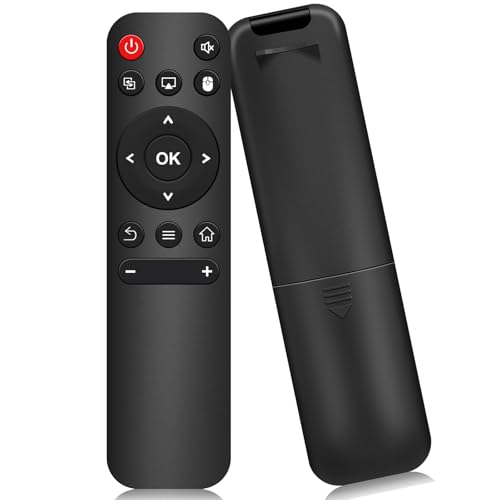
- Designed for listed HY300Pro-series mini projectors
- No setup required beyond adding two AAA batteries
- Lightweight infrared replacement remote
Best For: Owners replacing a lost or damaged compatible remote
Best Hub-Included Universal Remote

- Controls up to 25 IR and Bluetooth devices
- Includes Hub 3 for IR learning and custom scenes
- Works with standard IR projectors and Apple Home
Best For: Multi-device households wanting advanced remote customization
Best Hub-Based Pick
SofaBaton X1S Universal Remote

- Supports 6,000+ brands and 500,000 device models
- Hub-based 360-degree control with two IR blasters
- Custom activities, app features, and voice control
Best For: Multi-device projector and home theater setups
Best for Everyday Use
HY300/HY300Pro Projector Remote

- No programming or pairing required
- Designed for listed HY300Pro-family models
- 40-foot infrared range with a simple 15-button layout
Best For: Compatible HY300Pro-family mini projectors
Best Universal Handheld

- Controls IR, Bluetooth, and RF devices
- Macros combine commands across multiple devices
- Includes air-mouse mode and 40-foot IR range
Best For: Mixed projector, streaming, and audio systems
Model-Matched Pick

- Designed for listed HY300Pro-family projectors
- Adjustable backlit buttons for dark rooms
- 8m range with two-year warranty
Best For: Owners of compatible HY320/300Pro projectors
Simple Replacement

- Dedicated replacement for Aurzen EAZZE D1
- No pairing or setup required
- 8m range with wide-angle operation
Best For: Aurzen EAZZE D1 projector owners
Multi-Device Choice

- Controls projectors and other supported devices
- App setup with macros and button reassignment
- Up to 35 feet of infrared range
Best For: Multi-device home-entertainment setups
Best Smart-Home Universal Remote – SwitchBot Remote with Hub Mini Matter
For shoppers comparing smart remote controls for projectors, the SwitchBot Universal Remote with Hub Mini is a flexible option when the projector uses a standard infrared remote. It can also consolidate compatible TVs, air conditioners, soundbars, SwitchBot Bluetooth devices, and select Bluetooth TV boxes, though compatibility should be confirmed before purchase.
Best For: Users who want one rechargeable remote for an IR projector and other compatible home devices.
Pros:
- Supports standard IR projectors along with up to 25 total devices, including IR and select Bluetooth products.
- Hub Mini enables Matter and Apple Home integration for supported devices.
- Offers a large IR code library, learning options, a touch wheel, and up to 150 days of battery life.
Cons:
- Does not support RF remotes or most third-party Bluetooth devices.
- Requires 2.4GHz Wi-Fi and a Hub Mini or Hub 2 for Matter features.
- Google Home and Alexa do not currently support this remote type through Matter.
This is a strong multifunction choice for an IR projector setup, especially if you also use SwitchBot or Apple Home devices. Check the projector’s remote technology and model compatibility before ordering.
Best Direct Replacement – Xiaodib HY300Pro Mini Projector Remote
Among smart remote controls for projectors, this Xiaodib model is a straightforward replacement rather than a universal smart-home controller. It is designed for listed HY300Pro-series mini projectors and works through infrared, making model verification especially important before purchase.
Best For: Owners of a compatible HY300Pro-series mini projector who need a simple replacement remote.
Pros:
- Compatible with numerous listed Magcubic, HIPPUS, Aubor, Xgody, Maypug, and other HY300Pro-related models.
- Works out of the box after inserting two AAA batteries.
- Lightweight 20-gram design with responsive button control.
Cons:
- Supports only one compatible mini projector and is not a general-purpose smart remote.
- Batteries and a manual are not included.
- Compatibility is limited to the listed projector models.
This remote is a practical low-complexity replacement when your projector appears on the compatibility list. It is not the right pick for multi-device control, app customization, or smart-home integration.
Best Hub-Included Universal Remote – SwitchBot Remote with Hub 3
The SwitchBot Universal Remote with Hub 3 is a feature-rich choice for shoppers seeking smart remote controls for projectors and other home entertainment devices. It supports standard IR projectors, selected Bluetooth devices, custom scenes, and expanded learning features through the included Hub 3.
Best For: Households that want projector control, device consolidation, and customizable Apple Home automation in one package.
Pros:
- Controls up to 25 devices and supports up to 10 custom scenes.
- Included Hub 3 supports IR code matching, one-tap pairing, and key-by-key learning.
- Provides 19 buttons, a touch wheel, rechargeable power, and up to 150 days of battery life.
Cons:
- Does not support RF remotes or most third-party Bluetooth devices.
- Requires 2.4GHz Wi-Fi; Matter control is currently supported through Apple Home.
- Projector compatibility still depends on use of a standard IR remote.
Compared with a basic replacement remote, this bundle offers substantially broader control and customization. It is best suited to users who will take advantage of the Hub 3, scenes, and multi-device setup.
Best Budget Replacement – Molgoc HY300Pro Projector Remote
This Molgoc replacement is a basic infrared option for selected Magcubic, Aubor, Xgody, Maypug, and related mini projectors. For buyers researching smart remote controls for projectors, it is better understood as a model-specific replacement than a connected or programmable smart remote.
Best For: Owners of a listed HY300 or HY300Pro-series projector seeking a simple infrared replacement.
Pros:
- Lists compatibility with multiple specified portable projector models and ASINs.
- Uses infrared button control with a stated range of up to 10 meters.
- Compact replacement design backed by a 90-day warranty description.
Cons:
- Not compatible with every mini projector, including the specified Magcubic ASIN B0C84JLZ9K.
- Batteries and instructions are not included.
- Supports only one projector and has limited three-button controls listed in the details.
This can be a sensible replacement when your exact projector is listed, but the narrow compatibility makes checking the model essential. It does not offer Wi-Fi, Bluetooth, app control, or multi-device features.
Best Hub-Based Pick – SofaBaton X1S Universal Remote
For shoppers seeking smart remote controls for projectors and broader home entertainment systems, the SofaBaton X1S stands out for its hub-based control, customizable activities, and extensive device database. It can send commands without requiring direct aim and supports voice control through Alexa and Google Assistant.
Best For: Multi-device projector and home theater setups where centralized, cabinet-friendly control is useful.
Pros:
- Supports more than 6,000 brands and 500,000 device models through an updating database.
- Hub provides 360-degree control and includes two IR blasters for reducing signal blind spots.
- Custom activities can combine several commands into one action.
- Backlit controls, raise-to-wake functionality, and a “Find my remote” feature improve usability.
Cons:
- Its extensive hub and activity features may be more than needed for a single projector.
- Compatibility should still be checked for specific devices, especially less common models.
The X1S is the most feature-rich option here for a complete entertainment system. Its hub, macros, app support, and voice integration make it a strong choice when projector control is part of a larger setup rather than a standalone need.
Best for Everyday Use – HY300/HY300Pro Projector Remote
This replacement remote is a practical choice among smart remote controls for projectors when you need a straightforward controller for a compatible mini projector. It uses infrared control, requires no programming or pairing, and is designed for specific HY300 and HY300Pro-related models.
Best For: Owners of compatible HY300Pro-family mini projectors who need a simple backup or replacement remote.
Pros:
- Works out of the box without programming or pairing.
- Infrared 3.0 technology is specified for fast response and a range of up to 40 feet.
- Compatible with numerous listed models from brands including Xgody, Aubor, Maypug, Salange, and SKUOU.
- Simple 15-button design keeps operation straightforward.
Cons:
- Not compatible with the Magcubic HY300 or other unlisted mini-projector brands.
- Batteries and instructions are not included.
- Supports one projector device only and is not a universal remote.
Model verification is essential before ordering. If your projector appears on the compatibility list, this remote offers an inexpensive, no-setup replacement; otherwise, its narrow compatibility makes it a poor general-purpose choice.
Best Universal Handheld – SofaBaton U3 Smart Remote
The SofaBaton U3 is a flexible option for shoppers comparing smart remote controls for projectors alongside remotes for TVs, soundbars, streaming players, and disc players. It combines infrared, Bluetooth, and RF support with macros, an app, air-mouse navigation, and a continuously updated code library.
Best For: Entertainment systems that combine a projector or display with streaming, audio, and other connected devices.
Pros:
- Supports IR, Bluetooth, and RF devices through a database covering 6,000+ brands and 500,000 devices.
- Global macros can activate commands across multiple devices with one press.
- Can maintain simultaneous Bluetooth connections with up to three devices.
- Offers 40-foot IR range, air-mouse mode, and compatibility with the R1 repeater for hidden equipment.
Cons:
- Google Assistant control requires a Bluetooth device with native Google Assistant support.
- Voice control does not work with Apple TV, Fire TV, or standard IR-only devices.
- Projector compatibility should be confirmed through the device database before purchase.
The U3 is better suited to a mixed-device entertainment setup than to a projector alone. Its connectivity options and macro support provide useful flexibility, but some advanced features depend on the connected device’s Bluetooth or voice-control capabilities.
Model-Matched Pick – HY320/300Pro Backlit Remote
For shoppers seeking smart remote controls for projectors, this infrared replacement is a focused option for compatible HY320/300Pro and Gimbal 3/5 models. Its backlit, adjustable-brightness buttons and claimed 8-meter range suit dark home-theater use, while setup is designed to be quick.
Best For: Owners of supported HY300Pro-family projectors who want a model-specific replacement with illuminated buttons.
Pros:
- Designed for specified HY300Pro, Gimbal 3/5, and listed compatible projector systems.
- Backlit buttons offer three adjustable brightness levels.
- Claims an 8-meter infrared range and simple HOME+OK pairing.
- Includes a two-year warranty and lifetime technical support.
Cons:
- Supports one device, so it is not a multi-device entertainment remote.
- Compatibility is model-specific rather than broadly universal.
- AAA batteries are required.
This is a practical replacement when your projector matches the listed models. Verify compatibility carefully before buying; the specialized fit is its main advantage and limitation.
Simple Replacement – Aurzen EAZZE D1 Remote
This replacement is aimed specifically at Aurzen EAZZE D1 owners comparing smart remote controls for projectors. It works out of the box after inserting two AAA batteries, and its infrared design provides an advertised 8-meter range with a 120-degree operating angle.
Best For: Aurzen EAZZE D1 users who need a straightforward replacement remote without pairing or setup.
Pros:
- Made specifically for the Aurzen EAZZE D1 Smart Projector.
- Requires no setup or pairing after batteries are installed.
- Offers an advertised 8-meter range and 120-degree wide-angle operation.
- Curved ergonomic housing is intended for comfortable extended use.
Cons:
- It is not a universal Aurzen projector remote.
- Only supports one device.
- Batteries and a user manual are not included.
Choose this remote when you have confirmed the exact EAZZE D1 compatibility. Its no-pairing setup is convenient, but the narrow device support makes model verification essential.
Multi-Device Choice – SofaBaton U2 Universal Remote
For a mixed entertainment setup, the SofaBaton U2 is one of the more flexible smart remote controls for projectors. It is designed to replace multiple infrared and Bluetooth remotes, with app-assisted setup, customizable buttons, macros, and a claimed infrared range of up to 35 feet.
Best For: Users who want one remote for a projector and other supported home-entertainment devices.
Pros:
- Can replace 15 or more infrared and Bluetooth remotes, according to the supplied product notes.
- Database covers more than 6,000 brands and 500,000-plus devices.
- App supports infrared, Bluetooth, and learning-mode setup.
- Offers macros, button reassignment, and an advertised 35-foot infrared range.
Cons:
- Not compatible with Wi-Fi or wireless devices.
- More setup and configuration may be needed than with a dedicated replacement remote.
- Compatibility depends on the device being supported by the database or learning mode.
The U2 makes the most sense when your projector is part of a larger system. It offers substantially more control flexibility than single-device replacements, but users should confirm the projector’s connection type and compatibility before purchase.
How We Picked the Best Smart Remote Controls for Projectors
We focused on compatibility, convenience, and the type of control each remote provides. The selection includes dedicated replacement remotes for popular Magcubic, Aurzen, and compatible mini-projector models, along with universal options from SwitchBot and SofaBaton.
For universal remotes, we considered device support, app setup, activity or macro controls, hub functionality, and the ability to manage more than just a projector. For replacement remotes, the main priorities were model compatibility, straightforward operation, and whether the product is intended for a specific projector family. A replacement remote should not be assumed to work with every projector simply because the connector or product shape appears similar.
Quick Comparison
- Best for smart-home integration: SwitchBot remotes with a compatible hub and Matter-enabled features.
- Best for activity-based control: SofaBaton X1S, which is designed to coordinate multiple home-theater devices.
- Best for simple universal control: SofaBaton U2 or U3 for managing common entertainment equipment.
- Best for a specific mini projector: Model-matched replacement remotes for Magcubic, Aurzen, and compatible HY-series projectors.
Key Buying Factors for Smart Remote Controls for Projectors
Compatibility
Check the exact projector model number before ordering. HY300, HY300Pro, HY320, and similarly named models may use different remote codes. Also verify whether the remote controls only the projector or supports other infrared, Bluetooth, or hub-connected devices.
Direct Replacement or Universal Remote
A direct replacement is usually the simplest and most affordable choice when the original remote is lost or damaged. A universal remote is more useful when you want one controller for a projector, TV, soundbar, disc player, or streaming device.
Connectivity and Range
Infrared remotes generally require a clear line of sight, while Bluetooth and hub-based systems can offer more flexible placement. A hub may also let you control devices through an app or integrate commands into broader routines.
Apps, Macros, and Smart-Home Features
App support can simplify setup and customization, but it may add account, network, or battery-management requirements. Activity buttons and macros are valuable if you want one command to power on several devices and select the right inputs.
Who Should Buy Which Smart Remote Controls for Projectors?
Choose a dedicated replacement if you want an inexpensive, familiar controller for one compatible mini projector. Choose a SwitchBot model if app control, smart-home integration, Matter support, or multi-device management is important. SofaBaton’s universal remotes are a better fit for larger home-theater systems, especially when you want customized activities or a single controller for several components.
Finally, consider how often you use the projector and who will operate it. A simple replacement may be best for occasional viewing and guests, while a programmable universal remote can reduce clutter and make frequent movie nights much faster to start.