Choosing the right wireless video system for a multi-camera production means balancing range, latency, resolution, receiver capacity, and compatibility. The best option for a studio may differ greatly from the right kit for live events, classrooms, houses of worship, or portable shoots.
These 10 video transmitters for multi-camera setups cover a range of workflows, from professional SDI and HDMI monitoring to multi-TV distribution and compact camera-to-device links.
Best 10 Video Transmitters for Multi Camera Setups Picks for 2026
Professional 4K Control

- 4K30 HDMI and 1080p HDMI/3G-SDI support
- Up to 1,312 feet with low-latency monitoring
- Up to five destinations plus compatible camera control
Best For: Professional film crews and multi-camera productions
Multi-Display Simplicity

- Includes one transmitter and two receivers
- Supports up to six receivers and 165-foot open-space range
- 4K input, 1080p output, and plug-and-play HDMI setup
Best For: Multi-display presentations and straightforward HDMI monitoring
Flexible Crew Monitoring
Hollyland Pyro H Wireless HDMI

- 4K30 dual-band HDMI transmission with Smart Channel Scan
- Up to four receivers and a claimed 1,300-foot range
- HDMI loop-out plus UVC computer live streaming
Best For: Film crews and live-streaming teams using HDMI cameras
Long-Range Two-Screen Link
PWAY W3302-2RX Wireless HDMI Kit

- One transmitter sends 1080p to two receivers
- Claimed 1,640-foot open-environment range
- HDMI loop-out, battery slots, and mounting threads
Best For: Two-display camera monitoring and event AV setups
Best All-in-One Kit
1-to-5 Wireless HDMI Monitoring System
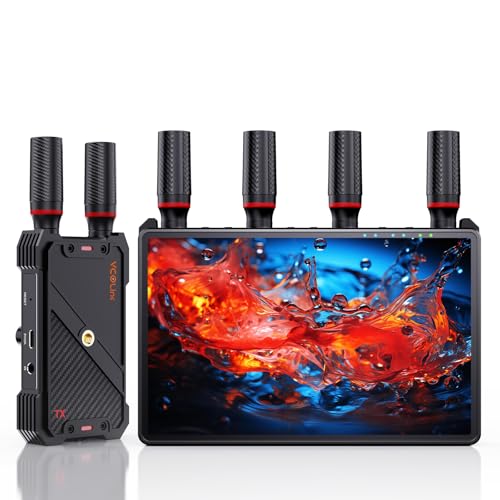
- Built-in 7-inch receiver monitor
- Supports up to five receivers
- 1080p/60Hz transmission up to 1,312 feet line of sight
Best For: Film crews and live productions needing several monitoring points
Best Long-Range Choice

- Up to 3 km transmission distance
- 1080p/60fps video with 35 ms minimum latency
- Broadcast mode supports unlimited receivers
Best For: Professional crews in complex or interference-prone locations
Best Multi-Display Value

- Includes one transmitter and four receivers
- 1080p/60Hz simultaneous multi-screen output
- Pre-paired setup with no Wi-Fi or Bluetooth required
Best For: Presentations, classrooms, venues, and fixed multi-display installations
Osmo Pocket 3 Streaming Pick
Pocket 3 UVC Wireless Video System

- Built for DJI Osmo Pocket 3 workflows
- UVC output for direct computer streaming
- 20 channels and support for up to five receivers
Best For: Pocket 3 creators and compact live-streaming rigs
Multi-Screen Event Pick
Wireless HDMI Pro 4-Receiver Kit

- One transmitter with four included receivers
- 165-foot open-range transmission claim
- Plug-and-play dual-band operation at up to 60Hz
Best For: Presentations, events, classrooms, and multi-TV displays
Long-Range Monitoring Pick
1080p HDMI System with Loop-Out

- Claimed 1,300-foot open-field range
- Transmitter loop-out for local monitoring
- Receiver supports two HDMI displays
Best For: Long-distance wireless monitoring with flexible screen connections
Professional 4K Control – Accsoon CineView SE 4K
For demanding video transmitters for multi camera setups, the Accsoon CineView SE 4K combines HDMI and 3G-SDI support with long-range wireless monitoring. It handles 4K up to 30p through HDMI, 1080p through HDMI or SDI, and can send a feed to up to five destinations using compatible receivers, mobile devices, and its USB-C connection.
Best For: Professional film crews, directors, and camera teams needing 4K monitoring, camera control, and long wireless range.
Pros:
- Supports 4K30 HDMI transmission and 1080p HDMI/3G-SDI workflows.
- Offers a claimed range of up to 1,312 feet and latency as low as 50ms at 1080p.
- Supports up to five monitoring destinations and compatible camera-control functions.
- Includes mobile monitoring through the Accsoon SEE app and USB-C video output.
Cons:
- Computer monitoring and UVC webcam capture are not supported through USB-C.
- Camera control is limited to listed compatible camera models and specified connection methods.
- Performance claims depend on clear, interference-free, line-of-sight conditions.
The CineView SE 4K is the most production-focused option here, especially for teams that need SDI compatibility, 4K delivery, and coordinated monitoring. Verify camera compatibility and mobile-device requirements before purchasing.
Multi-Display Simplicity – WELUSOPU Wireless HDMI Kit
For straightforward video transmitters for multi camera setups and multi-screen AV systems, this WELUSOPU kit includes one transmitter and two receivers. It supports up to six receivers, uses dual-band 2.4G/5G transmission, and sends 4K input to 1080p displays without requiring Bluetooth, Wi-Fi setup, or an app for its primary plug-and-play connection.
Best For: Presentations, classrooms, venues, home theaters, and simple camera or source-to-multiple-display installations.
Pros:
- Includes two receivers and supports up to six receivers simultaneously.
- Offers a claimed 165-foot range in open spaces with dual-band transmission.
- Accepts 4K input and provides 1080p output with stereo audio.
- Works with a broad range of HDMI sources, displays, cameras, and projectors.
Cons:
- Output is limited to 1080p even when the source provides 4K input.
- It is primarily an HDMI system and does not provide the listed SDI or professional camera-control features of the Accsoon unit.
- Smartphone and tablet viewing is described as mirroring only, without reverse operation.
This is a practical choice when the main goal is distributing one HDMI source to several screens rather than managing a full cinema-style wireless video network. Its included receivers make it convenient for multi-display deployments.
Flexible Crew Monitoring – Hollyland Pyro H Wireless HDMI
The Hollyland Pyro H is one of the more capable video transmitters for multi camera setups when a crew needs several monitoring points and computer streaming. Its HDMI input, output, and loop-out support 4K30 transmission, while dual-band operation, Smart Channel Scan, and compatibility with up to four receivers help simplify on-set coordination.
Best For: Film production, live streaming, ENG/EFP work, and crews needing long-range HDMI monitoring with UVC streaming.
Pros:
- Supports up to 4K30 video transmission over HDMI.
- Provides a claimed 1,300-foot range with 60ms latency.
- Can transmit to up to four receivers and supports the HollyView monitoring app.
- HDMI loop-out and UVC support allow local viewing and plug-and-play computer streaming.
Cons:
- Connectivity is HDMI-based, with no SDI input listed.
- The stated 1,300-foot range and 60ms latency are performance claims that can vary with conditions.
- The supplied configuration includes one transmitter and one receiver, so additional receiver hardware may be needed for larger teams.
Pyro H strikes a useful balance between production features and accessibility. Its loop-out and UVC support make it particularly versatile for teams that need both on-set monitoring and computer-based live streaming.
Long-Range Two-Screen Link – PWAY W3302-2RX Wireless HDMI Kit
For installations that need a simple long-distance connection, the PWAY W3302-2RX is a focused option among video transmitters for multi camera setups. One transmitter sends 1080p HDMI video to two receivers at the same time, while HDMI loop-out keeps a local monitor connected for camera or production monitoring.
Best For: Camera monitoring, churches, events, conference rooms, and AV systems requiring two remote displays.
Pros:
- Includes one transmitter and two receivers for simultaneous two-display output.
- Supports 1080p Full HD transmission and HDMI loop-out for local viewing.
- Claims up to 1,640 feet of range in open environments.
- Rear battery slots and threaded mounting holes support portable camera and rig use.
Cons:
- Video resolution is limited to 1080p.
- The supplied notes describe HDMI connectivity only, without 4K, SDI, app monitoring, or camera-control features.
- Long-range performance depends on the environment and obstacles.
The W3302-2RX is best viewed as a purpose-built two-display extender rather than a feature-heavy cinema wireless system. Its loop-out, mounting points, and included receivers make it useful for practical event and camera-monitoring deployments.
Best All-in-One Kit – 1-to-5 Wireless HDMI Monitoring System
For video transmitters for multi camera setups, this kit stands out when several people need a private or shared monitor. It sends 1080p video at 60Hz up to 1,312 feet in line-of-sight conditions, while each receiver includes a built-in 7-inch display and HDMI output.
Best For: Film crews, studios, and live events needing multiple monitoring points with minimal extra gear.
Pros:
- One transmitter can broadcast to up to five receivers.
- Built-in 7-inch receiver monitor, HDMI output, and 3.5mm headphone monitoring.
- HDMI loop out, IR remote control, and under 0.05-second stated latency.
- Supports NP-F batteries, power banks, or USB-C power.
Cons:
- The 1,312-foot range is specified for line-of-sight use.
- An HDMI cable is not included for connecting an external display.
- Smartphone and tablet use requires a Type-C-to-HDMI cable.
This is a flexible production-focused option, especially if the included receiver screens can replace separate on-set monitors. Its 1-to-5 design and multiple power choices make it practical for collaborative shoots.
Best Long-Range Choice – DJI SDR Wireless Video System
Among video transmitters for multi camera setups, the DJI SDR Transmission Combo is designed for demanding monitoring environments. It supports 1080p/60fps video at up to 20 Mbps, offers a stated 35 ms minimum latency, and uses automatic frequency hopping across multiple bands.
Best For: Professional crews working across complex locations that need long range, interference management, and flexible receiver access.
Pros:
- Transmission distance reaches up to 3 km in supported conditions.
- Auto frequency hopping across 2.4 GHz, 5.8 GHz, and DFS bands helps manage interference.
- Provides SDI, HDMI, USB-C, and direct Wi-Fi monitoring options.
- Broadcast mode supports an unlimited number of receivers, according to the supplied notes.
Cons:
- The supplied notes do not specify a built-in monitor.
- Its advanced feature set may be more than basic point-to-point monitoring requires.
- The stated distance and performance will depend on the shooting environment.
The DJI is the strongest fit when range, penetration, and scalable monitoring matter more than a simple plug-and-play presentation setup. Compatibility with Ronin systems adds value for crews already using DJI stabilization equipment.
Best Multi-Display Value – G9R Pro 1-to-4 HDMI Extender
This G9R Pro is a practical choice for video transmitters for multi camera setups when the goal is simultaneous playback on several displays. The kit includes one transmitter and four receivers, supports 1080p/60Hz output, and is pre-paired for a quick setup without Wi-Fi or Bluetooth.
Best For: Conference rooms, classrooms, churches, bars, restaurants, and events that need one HDMI source shown on multiple screens.
Pros:
- One transmitter can feed four receivers and four displays simultaneously.
- Pre-paired plug-and-play setup requires no drivers or pairing app.
- Supports dual-band 2.4 GHz/5.8 GHz transmission up to 165 feet in open areas.
- Includes a USB-C-to-HDMI adapter for compatible newer laptops.
Cons:
- The transmitter must connect to an HDMI output device, not directly to a TV.
- The transmitter supports 1080p output only, despite receiver 4K decoding input support.
- Transmission through walls or ceilings is specified at about 50 feet.
This system is best understood as a multi-screen HDMI distribution kit rather than a long-range cinema transmitter. Its four included receivers and simple setup make it appealing for fixed installations and presentations.
Osmo Pocket 3 Streaming Pick – Pocket 3 UVC Wireless Video System
For creators building video transmitters for multi camera setups around the DJI Osmo Pocket 3, this system combines a built-in Type-C transmitter connection with a receiver that can output video directly to a computer as a UVC webcam. It supports up to 1080p at 60Hz and offers flexible monitoring options for live production.
Best For: Osmo Pocket 3 owners who want wireless HDMI monitoring or direct computer streaming through OBS without a separate capture device.
Pros:
- Built-in Type-C transmitter connection is designed for the DJI Osmo Pocket 3.
- UVC output supports direct connection to a computer for streaming at up to 1080p@60Hz.
- Offers 20 selectable channels and a status display showing connection, signal, resolution, and battery information.
- Supports one transmitter with up to five receivers and includes transmitter-side HDMI loop-out for local monitoring.
Cons:
- Advertised 1,640-foot range applies to open line-of-sight conditions; walls and metal obstacles can significantly reduce coverage.
- NP-F batteries are not included.
This is the most specialized option in the group, especially if the Pocket 3 is part of your camera package. Its UVC workflow and multi-receiver support are useful for streaming and monitoring, while the channel display helps with setup in busy wireless environments.
Multi-Screen Event Pick – Wireless HDMI Pro 4-Receiver Kit
When a multi camera setup needs to feed several displays, this kit provides one HDMI transmitter and four receivers for multi-screen distribution. It uses dual-band 2.4GHz/5.8GHz transmission, supports 1080p video at up to 60Hz, and is designed for presentations, classrooms, churches, conferences, and other portable events.
Best For: Teams that need to send one HDMI source to multiple TVs or monitors without installing a wired splitter or network-based video system.
Pros:
- Includes four receivers for displaying one source across multiple TVs or monitors.
- Supports up to 165 feet in open environments and up to 50 feet through walls under suitable conditions.
- Pre-paired plug-and-play setup requires no apps, drivers, or Wi-Fi.
- Dual-band operation, heat-control technology, and a claimed 0.1-second latency support extended use.
Cons:
- The 165-foot range is measured in open conditions, while walls and large obstacles reduce transmission distance.
- It is primarily a one-source-to-multiple-display system rather than a dedicated multi-camera switching solution.
- Each transmitter and receiver requires a USB 5V/1A power source.
The included four-receiver bundle makes this a practical choice for distributing a feed across several screens. It is better suited to simultaneous display than camera-to-camera switching, so confirm that your production workflow can provide the desired HDMI source.
Long-Range Monitoring Pick – 1080p HDMI System with Loop-Out
For video transmitters for multi camera setups where distance and local monitoring matter, this point-to-point HDMI system provides wireless 1080p transmission with a claimed 1,300-foot open-field range. It also adds transmitter loop-out, dual HDMI output on the receiver, IR remote support, and several power options for cameras, laptops, set-top boxes, TVs, and projectors.
Best For: Production teams that need a long-range wireless link with a local confidence monitor and the ability to display the receiver feed on two screens.
Pros:
- Supports up to 1080p@60Hz with a claimed 0.05-second latency.
- Transmitter HDMI loop-out enables local monitoring at the source.
- Receiver provides dual HDMI outputs for connecting two screens simultaneously.
- Supports IR expansion and multiple power options, including USB-C, adapters, portable power, and NP-F batteries.
Cons:
- The 1,300-foot range is specified for open, interference-free conditions; walls, glass, brick, and metal can reduce signal quality.
- Batteries are not included.
- Adding more receivers can reduce the wireless transmission distance.
This model stands out for monitoring flexibility rather than a bundled multi-receiver configuration. The loop-out and dual receiver outputs are useful when camera operators and directors need to view the same feed in different locations, provided the installation maintains a clear signal path.
How We Picked the Best Video Transmitters for Multi Camera Setups
We focused on systems that can support practical multi-camera workflows, whether by accepting multiple receivers, feeding several displays, offering loop-out monitoring, or providing the range needed for live production spaces. We also considered advertised resolution, transmission distance, latency, connection types, control features, portability, and setup simplicity.
Specifications such as range and latency are typically measured under ideal conditions. Walls, competing wireless networks, antenna placement, line of sight, and local regulations can significantly affect real-world performance.
Quick Comparison
| What to Compare | Best Fit | Why It Matters |
|---|---|---|
| 4K support | Detailed monitoring and professional production | Preserves image detail, but may require compatible cameras, displays, and more bandwidth. |
| 1080p systems | Live events, classrooms, and general monitoring | Usually offers broad compatibility and lower bandwidth demands. |
| Multiple receivers | Multi-room or multi-display distribution | Lets one camera feed reach several screens without separate transmitters. |
| SDI and HDMI inputs | Mixed professional and consumer equipment | Provides more flexibility across cameras, switchers, and monitors. |
| Loop-out or UVC output | Recording, streaming, or local monitoring | Allows the source signal to continue to another display or computer. |
Key Buying Factors for Video Transmitters for Multi-Camera Setups
Inputs, Outputs, and Camera Compatibility
Check whether each transmitter uses HDMI, SDI, USB, or a combination. Confirm the supported resolution and frame rate at both the camera and receiver. A system that accepts 4K input may still output only 1080p, so read the complete signal path before buying.
Receiver Count and Distribution
For several camera operators or viewing locations, confirm how many receivers can be paired with one transmitter and whether each receiver must be purchased separately. Multi-receiver kits are useful for sending one feed to several displays, but they do not necessarily combine multiple camera feeds into one program output.
Range, Latency, and Interference
Long advertised range is helpful, but line of sight matters. Low latency is especially important for camera operators, presenters, and live switching. Dual-band or interference-resistant systems may perform more reliably in crowded venues, while 5.8 GHz options can be affected by obstacles and local congestion.
Power and Deployment
Battery-powered units suit mobile shoots, while AC-powered kits are often better for permanent installations. Look for mounting options, heat management, antenna design, and simple pairing if the system will be operated by a rotating crew.
Who Should Buy Which Video Transmitters for Multi Camera Setups?
Professional crews: Choose a system with SDI support, dependable monitoring, low latency, and robust camera-control or loop-out features.
Event and venue operators: Prioritize long range, stable performance, and multiple receivers for distributing a feed to several screens.
Studios and classrooms: A 1080p multi-receiver HDMI kit may provide the best value when several displays need the same source.
Mobile creators: Look for compact transmitters, battery flexibility, straightforward pairing, and USB or UVC output for computers and streaming devices.
Before ordering, verify connector type, supported frame rates, receiver compatibility, power requirements, and whether the advertised range matches your venue layout. For complex productions, test the complete system with every camera, display, and wireless device before the event.