A dependable Thunderbolt cable can determine whether a desktop dock, monitor, external SSD, or laptop connection performs as expected. The right choice balances bandwidth, length, charging power, certification, and compatibility.
We selected 10 Thunderbolt 4 and Thunderbolt 5 cables for different desktop workflows, from compact workstation connections to longer runs between a computer and dock. Use the guide below to narrow the options by performance needs and setup constraints.
Best 10 Thunderbolt Cables for Desktop Setups Picks for 2026
Top-Tier Speed
Anker Prime Thunderbolt 5 Cable

- 80Gbps data transfer and 240W charging
- Supports dual 8K displays at 60Hz
- 3.3-foot cable with 18-month warranty
Best For: High-performance workstations and multi-display desks
Extended Reach
Cable Matters Active Thunderbolt 4 Cable

- 6.6-foot Intel-certified active cable
- 40Gbps data and up to 100W charging
- Supports dual 4K or single 8K displays
Best For: Longer connections between desktop devices
Durable 80Gbps Value
UGREEN USB-C Thunderbolt 5 Cable

- 80Gbps transfers and 240W PD 3.1 charging
- Supports dual 8K or triple 4K displays
- Braided design rated for up to 10,000 bends
Best For: Gaming, creative work, and large file transfers
Certified Everyday Choice
Cable Matters Thunderbolt 4 Cable

- Intel-certified 40Gbps Thunderbolt 4
- Supports up to 240W PD 3.1 charging
- Handles one 8K or two 4K displays
Best For: Compact Thunderbolt 4 and USB4 desktop setups
Pro-Workflow Powerhouse

- 80Gbps data with 120Gbps video boost
- Dual 8K or triple 4K display support
- 240W charging for fixed workstations
Best For: Professional multi-monitor desktop workstations
Balanced Everyday Pick

- 40Gbps USB4 data transfers
- Supports 8K at 60Hz video
- Compact 3.3-foot length with 240W charging
Best For: Compact desks and everyday USB4 connections
Long-Reach Workstation Value
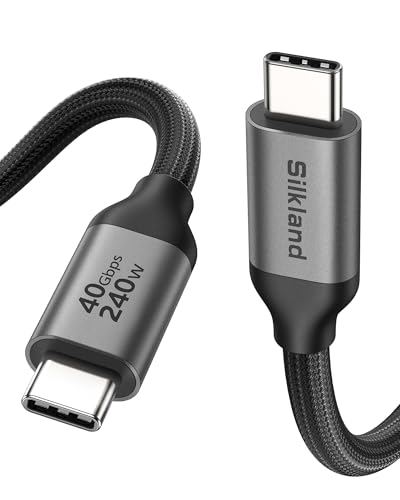
- Five-foot reach for spread-out desks
- 40Gbps data and 240W PD 3.1
- Supports 8K or dual 4K displays
Best For: Larger desktop layouts and laptop-to-dock connections
Premium Certified Pick
Anker Prime Thunderbolt 4 Cable

- 40Gbps data and 240W charging
- Single 8K or dual 4K display support
- Thunderbolt 4-certified and USB4 compliant
Best For: Premium laptop and multi-display workstations
Heavy-Duty Display Pick

- 40Gbps transfers and 240W power delivery
- Single 8K or dual 4K display support
- Braided design with aluminum shell
Best For: High-resolution creator and multitasking setups
Durable All-in-One Pick

- 240W charging and 40Gbps data
- Single 8K at 60Hz video output
- Braided design rated for 10,000 bends
Best For: Simplified USB-C laptop and monitor setups
Top-Tier Speed – Anker Prime Thunderbolt 5 Cable
For desktop setups that need maximum bandwidth, this 3.3-foot Anker Prime cable is a strong pick among thunderbolt cables for desktop setups. It combines claimed 80Gbps transfers, 240W charging, and support for dual 8K displays at 60Hz in a compact USB-C-to-USB-C design.
Best For: High-performance workstations, multi-display desks, and fast file transfers.
Pros:
- Supports up to 80Gbps data transfer and 240W charging.
- Designed for dual 8K displays at 60Hz with up to 120Gbps bandwidth.
- Includes an 18-month warranty and a 3.3-foot length suited to tidy desktop layouts.
Cons:
- The short 3.3-foot length may not suit widely spaced components.
- Its highest performance requires compatible Thunderbolt 5 or USB-C devices.
This is the most performance-focused option in the group, especially if your desktop includes demanding displays, large storage devices, or a high-power laptop. Choose it when you can take advantage of Thunderbolt 5 capabilities.
Extended Reach – Cable Matters Active Thunderbolt 4 Cable
When your desktop components are spread out, this 6.6-foot active cable offers useful reach without giving up Thunderbolt 4 performance. It delivers 40Gbps data, up to 100W Power Delivery, and support for dual 4K or single 8K displays.
Best For: Extended home or professional workstations with docks, monitors, or eGPUs.
Pros:
- Long 6.6-foot design helps connect equipment across a larger desk.
- Intel-certified Thunderbolt 4 and USB4 support at up to 40Gbps.
- Supports dual 4K or single 8K video and up to 100W charging.
Cons:
- Its 100W charging limit is lower than some newer alternatives.
- Active cable construction may be more than needed for short connections.
This is a practical choice when cable length matters more than maximum charging capacity. Its certified Thunderbolt 4 support and broad backward compatibility make it a flexible link for modern and Thunderbolt 3 desktop hardware.
Durable 80Gbps Value – UGREEN USB-C Thunderbolt 5 Cable
UGREEN’s 3.3-foot cable targets demanding desktop users who want fast transfers, high-power charging, and a durable exterior. It supports claimed 80Gbps bandwidth, 240W PD 3.1 charging, and advanced display configurations through USB4 Gen4 and Thunderbolt compatibility.
Best For: Gaming rigs, creative workstations, and users moving large files between fast storage devices.
Pros:
- Combines 80Gbps data transfer with 240W charging.
- Supports up to 16K at 60Hz, dual 8K, or triple 4K at 144Hz according to the supplied specifications.
- Nylon braiding, triple shielding, and a stated 10,000-bend lifespan support frequent use.
Cons:
- The 3.3-foot length limits placement flexibility.
- Maximum performance depends on compatible USB4 or Thunderbolt hardware.
For a performance-heavy desktop setup, this cable offers an appealing combination of speed, charging capacity, and physical durability. It is particularly well suited to large media files and demanding multi-monitor configurations.
Certified Everyday Choice – Cable Matters Thunderbolt 4 Cable
This 3.3-foot Intel-certified Cable Matters model is a straightforward option for compact desktop setups. It provides 40Gbps Thunderbolt 4 performance, up to 240W PD 3.1 charging, and support for one 8K or two 4K displays.
Best For: Compact professional or home desks using Thunderbolt 4, USB4, or compatible Thunderbolt 3 devices.
Pros:
- Certified Thunderbolt 4 cable with 40Gbps data transfer.
- Supports up to 240W Power Delivery 3.1.
- Works with USB4 and is backward compatible with Thunderbolt 3, while supporting one 8K or two 4K displays.
Cons:
- The 3.3-foot length may be restrictive for larger desks.
- It does not offer the 80Gbps bandwidth listed for the Thunderbolt 5-oriented options.
This cable is a balanced fit for users who want certified compatibility and strong charging without moving to Thunderbolt 5. Its short length is best for neatly arranged laptops, docks, and monitors positioned close together.
Pro-Workflow Powerhouse – Maxonar Thunderbolt 5 Cable
For demanding thunderbolt cables for desktop setups, the Maxonar Thunderbolt 5 Cable is built around sustained bandwidth rather than portability. Its 80Gbps bidirectional data rate, 120Gbps video boost, and 240W PD 3.1 support suit fixed workstations with high-speed storage, docks, and multiple displays.
Best For: Professional desktop workstations, 16K video editing, 3D rendering, and multi-monitor setups.
Pros:
- Supports 80Gbps data and a 120Gbps video bandwidth boost.
- Handles dual 8K at 60Hz or triple 4K at 144Hz displays.
- Provides up to 240W PD 3.1 charging and includes two-year support.
- Uses heavy-duty braiding and multilayer shielding for stationary use.
Cons:
- Its thick, rigid construction is not ideal for travel or tight cable routing.
- The advanced Thunderbolt 5 performance may exceed the needs of basic peripherals.
The Maxonar is the performance-first choice here, especially when a desktop setup needs maximum current-generation bandwidth and multiple high-resolution displays. Plan the cable path before installation because its stiffness is part of the design.
Balanced Everyday Pick – Anker 515 USB4 Cable
The Anker 515 is a compact option among thunderbolt cables for desktop setups, offering USB4 speeds in a 3.3-foot length. It supports 40Gbps transfers, up to 8K at 60Hz video, and as much as 240W charging when paired with compatible equipment.
Best For: Compact desk layouts, laptops connected to one monitor, and everyday USB4 or Thunderbolt 3/4 accessories.
Pros:
- Transfers data at up to 40Gbps.
- Supports up to 8K at 60Hz or 4K at 144Hz display output.
- Offers up to 240W charging with compatible chargers and devices.
- Tested to withstand up to 5,000 bends and includes an 18-month warranty.
Cons:
- At 3.3 feet, it may be too short for larger or more spread-out desks.
- It does not provide the 80Gbps data bandwidth of the Thunderbolt 5 option.
This Anker cable is a sensible middle ground for a tidy desktop: short, durable, and fast enough for common USB4 and Thunderbolt 3/4 workflows. Choose it when 40Gbps performance meets your storage and display requirements.
Long-Reach Workstation Value – Silkland USB4 Cable
The Silkland USB4 cable combines a useful five-foot reach with 40Gbps performance, making it a practical choice for thunderbolt cables for desktop setups where components are not positioned side by side. It also supports 240W PD 3.1 charging and a range of high-resolution display configurations.
Best For: Larger desks, laptop-to-dock connections, external SSDs, and users who need extra cable reach.
Pros:
- Provides up to 40Gbps data transfer and supports Thunderbolt 4 functionality.
- Supports one 8K display, one 5K display, or dual 4K at 60Hz.
- Delivers up to 240W PD 3.1 charging with an E-Marker chip.
- Includes braided construction, EMI-resistant shielding, and 24-month customer care.
Cons:
- The manufacturer recommends cables under five feet for more stable dock connections.
- It offers 40Gbps rather than Thunderbolt 5-class 80Gbps data performance.
Silkland is a strong fit when reach matters without giving up modern USB4 capabilities. Its five-foot length can simplify larger desk layouts, though users connecting directly to a dock may prefer a shorter cable for the most stable arrangement.
Premium Certified Pick – Anker Prime Thunderbolt 4 Cable
For desktop setups that need dependable high-speed connectivity, the Anker Prime is a well-rounded choice among thunderbolt cables for desktop setups. It combines Thunderbolt 4 certification with 40Gbps transfers, 240W charging, and support for a single 8K or dual 4K displays.
Best For: Users building a premium workstation around a laptop, dock, fast storage, or multiple displays.
Pros:
- Supports 40Gbps data transfers and 240W charging.
- Handles a single 8K or dual 4K display setup.
- Thunderbolt 4-certified and USB4 compliant.
- Includes an 18-month warranty.
Cons:
- At 3.3 feet, it may be short for some desk layouts.
- Dual-display daisy chaining requires compatible DisplayPort Alt Mode or Thunderbolt hardware.
The Anker Prime is a strong all-purpose option when certification, charging headroom, and display support matter as much as transfer speed. Verify your computer and monitors support the required display modes before using dual displays.
Heavy-Duty Display Pick – Acer USB4 Thunderbolt 4 Cable
The Acer USB4 cable is designed for demanding thunderbolt cables for desktop setups, pairing 40Gbps bandwidth with high-resolution display support and 240W power delivery. Its braided exterior and aluminum shell are aimed at frequent daily use around monitors, docks, SSDs, and laptops.
Best For: Creators and multitaskers using 8K or dual 4K displays, fast storage, and high-power USB-C devices.
Pros:
- Supports 40Gbps transfers and 240W charging.
- Drives a single 8K display or dual 4K displays when the host supports DisplayPort Alt Mode.
- Braided construction and an aluminum shell help resist everyday wear.
- Compatible with Thunderbolt 3/4, USB4, and USB 3.2 devices.
Cons:
- Display capabilities depend on the host device’s DisplayPort Alt Mode support.
- Its 3.3-foot length may not suit larger desk layouts.
This Acer cable makes sense for a performance-oriented desk where display output and durability are priorities. Its broad compatibility is useful, but confirm the specifications of the computer, dock, and monitors before expecting dual-display output.
Durable All-in-One Pick – UGREEN 240W USB-C Cable
For a streamlined desktop setup, the UGREEN 240W cable combines charging, data, and video in one 3.3-foot connection. It is a practical entry among thunderbolt cables for desktop setups, with 40Gbps transfers, 8K at 60Hz output, and compatibility with Thunderbolt 4/3 and USB4 devices.
Best For: Users who want one durable cable for a USB-C laptop, monitor, SSD, dock, or phone.
Pros:
- Provides 240W PD 3.1 charging and backward compatibility with lower-power devices.
- Supports 40Gbps data transfer and single 8K at 60Hz video output.
- Nylon braiding is rated for up to 10,000 bends.
- Uses aluminum housing, triple shielding, and reinforced strain relief.
Cons:
- The supplied notes specify single 8K video output rather than dual-display support.
- Its 1-meter length may be limiting for some desktop arrangements.
The UGREEN is a sensible choice when durability and versatility are more important than multi-display expansion. It can simplify a desk with one cable for charging, fast storage, and high-resolution video, provided your connected devices support those capabilities.
How We Picked the Best Thunderbolt Cables for Desktop Setups
We focused on cables that clearly state their supported Thunderbolt or USB4 standard, data rate, power-delivery rating, and cable length. Intel certification is a useful confidence signal for Thunderbolt 4 compatibility, while Thunderbolt 5 and USB4 Gen 4 options can make sense for newer systems that support higher bandwidth.
We also considered practical desktop factors: whether the cable is active or passive, the display resolutions it can support, connector durability, and whether its length suits a dock, monitor, storage device, or charging connection.
Quick Comparison
- Best for next-generation bandwidth: Thunderbolt 5 and USB4 Gen 4 cables rated up to 80Gbps.
- Best general-purpose standard: Certified Thunderbolt 4 cables rated at 40Gbps.
- Best for high-power charging: Models rated for up to 240W USB Power Delivery.
- Best for longer desktop runs: A 5- or 6.6-foot cable, especially when routing around a monitor or dock.
- Best for compact setups: A 3.3-foot cable reduces slack and keeps connections tidy.
Key Buying Factors for Thunderbolt Cables for Desktop Setups
Bandwidth and Protocol
Choose Thunderbolt 4 for reliable 40Gbps connectivity across docks, storage, and displays. Thunderbolt 5 or USB4 Gen 4 is better suited to compatible newer computers and demanding multi-device workflows, but a faster cable cannot upgrade hardware that supports only a slower standard.
Length and Cable Design
Short cables are usually easier to manage and work well when a laptop or desktop sits beside a dock. For a monitor arm, under-desk computer, or rear-mounted docking station, a 4- to 6.6-foot option may be more practical. Active cables can help maintain high-speed performance over longer distances, but verify compatibility for your exact use.
Power and Display Support
A 240W rating is valuable for charging compatible laptops and accessories, though the host, charger, and device must also support that power level. Check the product specifications for 8K or dual-4K support if your desktop includes high-resolution displays; resolution limits depend on the computer, dock, monitor, and graphics hardware as well as the cable.
Certification and Compatibility
Look for Thunderbolt certification when predictable interoperability matters. USB-C describes the connector shape, not the performance standard, so confirm the cable’s actual data rate and supported features rather than relying on the USB-C label alone.
Who Should Buy Which Thunderbolt Cables for Desktop Setups?
Choose a certified Thunderbolt 4 cable for most office workstations, docks, external drives, and dual-display setups. Pick a Thunderbolt 5 or USB4 Gen 4 model if your computer and peripherals support the newer standard and you want more headroom for high-bandwidth storage or displays. Select a longer cable for flexible desk layouts, or a 3.3-foot model for a clean, close-range connection. If charging is part of the setup, prioritize a clearly stated 240W rating—but confirm that every device in the chain supports the required USB Power Delivery profile.