Large ultrawide monitors can transform a desk, but their size and weight demand more than a basic monitor arm. The best wall mounts combine verified load capacity, a suitable VESA pattern, dependable hardware, and enough adjustment range for comfortable positioning.
We’ve gathered 10 monitor wall mounts for heavy devices, including single-screen, dual-stacked, telescoping, extra-long-arm, and curved-monitor options. Use the guide below to narrow the list by screen size, weight, wall type, and the viewing flexibility you need.
Best 10 Monitor Wall Mounts for Heavy Devices Picks for 2026
Heavy-Duty Ultrawide Pick
VIVO Single Ultrawide Wall Mount

- Supports up to 49-inch, 44-pound displays
- Tilts, swivels, and levels the screen
- Extends 10.5 inches and manages cables
Best For: Single ultrawide monitor installations
Dual-Display Workhorse
Mount-It! Stacked Monitor Wall Mount

- Supports two monitors up to 44 pounds each
- Independent tilt, swivel, rotation, and height adjustment
- Keeps both screens close to the wall
Best For: Heavy dual-monitor control rooms and workstations
Low-Profile Ultrawide
VIVO TeleSpan Telescoping Wall Mount

- Holds 49-inch ultrawide screens up to 44 pounds
- Telescopes from 1.5 to 10.3 inches
- Includes tilt, swivel, and rotation adjustments
Best For: Space-conscious heavy ultrawide setups
Compact Full-Motion Choice

- Supports 13- to 34-inch monitors up to 19.8 pounds
- Extends 20.47 inches and retracts close to the wall
- Provides broad tilt, swivel, rotation, and height adjustment
Best For: Small monitors and tight wall-side workspaces
Top Heavy-Duty Pick
57-Inch Ultrawide Monitor Wall Mount
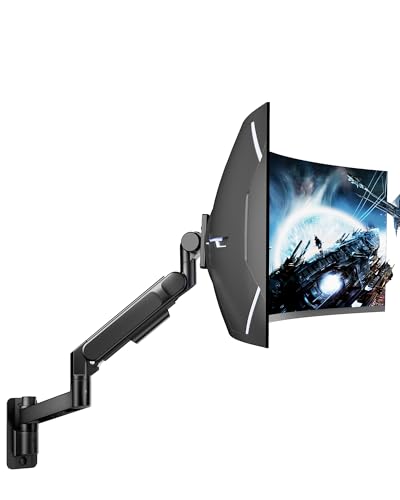
- Supports up to 57-inch screens and 60 pounds
- Bearing head helps with heavy-monitor tilt adjustments
- Full motion with cable management
Best For: Large ultrawide gaming and workstation displays
Versatile Heavy-Duty Choice
VIVO 49-Inch Monitor Wall Mount
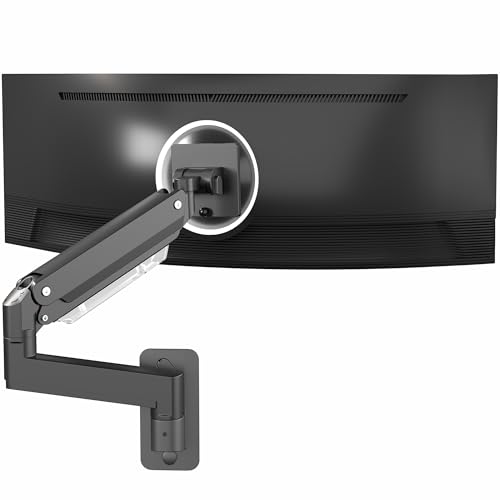
- Holds one monitor up to 49 inches and 44 pounds
- Pneumatic spring offers height and position adjustment
- Quick-release VESA plate and cable management
Best For: Flexible mounting of ultrawide or curved monitors
Best Adjustable Value

- Supports up to 49-inch screens and 44 pounds
- Extends 23.9 inches and retracts near the wall
- Broad tilt, swivel, rotation, and height adjustment
Best For: Flexible ultrawide setups needing desk-space savings
Best with Extra Features
VIVO Single Ultrawide Wall Mount

- Supports up to 49-inch screens and 44 pounds on wood studs
- 6.3 inches of height adjustment
- Full motion with a 4.25-inch low-profile design
Best For: Large ultrawide monitors and standing workstations
Best Extra-Long Arm
ErgoFocus Extra Long Monitor Wall Mount
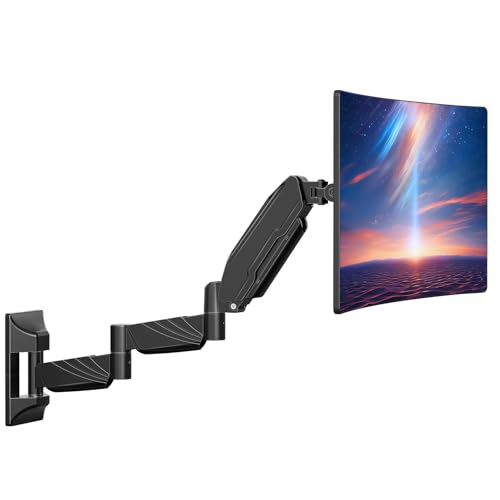
- 27.97-inch arm helps clear small desks
- Supports screens up to 32 inches and 17.6 pounds
- Full motion with integrated cable management
Best For: Small desks needing extended monitor reach
Heavy-Duty Ultrawide Pick – VIVO Single Ultrawide Wall Mount
For monitor wall mounts for heavy devices, this VIVO model is a practical single-screen option for ultrawide displays. Its steel construction supports monitors up to 49 inches and 44 pounds while offering useful positioning adjustments.
Best For: Users mounting one large ultrawide monitor above a desk or workstation.
Pros:
- Supports most ultrawide monitors up to 49 inches and 44 pounds.
- Offers tilt, swivel, and screen-leveling adjustments.
- Collapses to the wall or extends up to 10.5 inches.
- Includes integrated cable management and a three-year warranty.
Cons:
- Limited to VESA 75x75mm and 100x100mm patterns.
- Designed for a single display.
This is a strong fit when heavy-duty capacity and ultrawide compatibility matter more than extensive extension. Its low-profile design helps conserve space while retaining basic full-motion flexibility.
Dual-Display Workhorse – Mount-It! Stacked Monitor Wall Mount
Among monitor wall mounts for heavy devices, this Mount-It! system stands out for supporting two substantial displays on one wall-mounted pole. Each monitor can weigh up to 44 pounds, making it suitable for demanding multi-screen workstations.
Best For: Control rooms, dispatch stations, trading desks, and offices that need two stacked monitors.
Pros:
- Holds two 17- to 49-inch monitors, up to 44 pounds each.
- Each screen independently tilts, swivels, rotates, and adjusts in height.
- Provides 28.7 inches of positioning range while keeping screens 6.5 inches from the wall.
- Includes cable management and a limited lifetime warranty.
Cons:
- Requires a wood stud, brick, or solid concrete wall; drywall alone is not suitable.
- Its stacked layout may not suit side-by-side viewing preferences.
This is the most capable choice here for a heavy dual-monitor setup. The shared pole simplifies the installation, but the mounting surface must provide solid structural support.
Low-Profile Ultrawide – VIVO TeleSpan Telescoping Wall Mount
This VIVO TeleSpan mount is designed for monitor wall mounts for heavy devices where a large ultrawide screen needs both close-to-wall support and adjustable reach. Its telescoping arms slide from 1.5 to 10.3 inches while supporting up to 44 pounds.
Best For: Large ultrawide monitors in space-conscious wall-side workstations.
Pros:
- Supports ultrawide monitors up to 49 inches and 44 pounds.
- Telescoping arms balance low-profile placement with adjustable extension.
- Provides tilt, swivel, and rotation for viewing and leveling.
- Comes pre-assembled with cable clips and mounting hardware.
Cons:
- Listed for 49-inch displays rather than a broad range of screen sizes.
- Swivel range decreases as the arms are compressed.
- Requires wood-stud or concrete/brick installation.
The TeleSpan is a focused option for a heavy ultrawide display that should sit close to the wall but still move forward when needed. Its pre-assembled design can also simplify setup.
Compact Full-Motion Choice – ErGear Single Arm Wall Mount
For smaller displays, this ErGear arm offers monitor wall mounts for heavy devices without using desk space. It supports 13- to 34-inch monitors up to 19.8 pounds and provides a wide extension and adjustment range.
Best For: Compact desks, thick desktops, tight corners, and wall-side workspaces using smaller monitors.
Pros:
- Supports 13- to 34-inch monitors weighing up to 19.8 pounds.
- Extends up to 20.47 inches and retracts to 3.54 inches.
- Offers tilt, swivel, rotation, and 12.2 inches of height adjustment.
- Mounts to wood studs, concrete, or brick without desk clamps.
Cons:
- Lower weight capacity than the heavy-duty ultrawide models.
- Drywall-alone installation is not recommended.
- Limited to monitors up to 34 inches.
This mount is best viewed as a compact, highly adjustable solution rather than a maximum-capacity bracket. It is especially useful when desk clamps are impractical or desk space is limited.
Top Heavy-Duty Pick – 57-Inch Ultrawide Monitor Wall Mount
For shoppers comparing monitor wall mounts for heavy devices, the ARES WING GDT1008WLBK stands out with support for screens up to 57 inches and a 60-pound capacity. Its bearing-head design is intended to make tilt adjustments smoother when handling heavier displays.
Best For: Large ultrawide monitors, professional workstations, and immersive gaming setups.
Pros:
- Supports monitors from 24 to 57 inches and up to 60 pounds.
- Offers +60° to -20° tilt, ±90° swivel, and ±90° rotation.
- Steel-and-aluminum construction includes integrated cable management.
- Includes installation hardware and step-by-step instructions.
Cons:
- Designed only for 75×75 or 100×100 VESA mounting without an adapter.
- For stability, installation should use a wood stud, concrete, or brick wall.
This is the strongest option in the group for oversized, heavy ultrawide displays. Verify the wall structure and VESA pattern before installation.
Versatile Heavy-Duty Choice – VIVO 49-Inch Monitor Wall Mount
The VIVO MOUNT-V101G1 is a practical choice among monitor wall mounts for heavy devices, supporting one monitor up to 44 pounds. Its pneumatic spring arm provides adjustable height and broad positioning for compatible ultrawide or standard screens.
Best For: Users who want a flexible wall-mounted arm for ultrawide or curved monitors up to 49 inches.
Pros:
- Supports ultrawide monitors up to 49 inches and up to 44 pounds.
- Provides -45° to +45° tilt, 180° swivel, and 360° rotation.
- Includes 13 inches of height adjustment and a quick-release VESA plate.
- Hardware is included for wood, concrete, and brick wall installation.
Cons:
- VESA support is limited to 75x75mm and 100x100mm patterns.
- A VESA adapter is required for monitors without mounting holes and is not included.
With its counterbalance adjustment and quick-release bracket, this VIVO arm balances heavy-screen support with installation convenience. Check the monitor’s weight, VESA pattern, and wall type first.
Best Adjustable Value – 49-Inch Ultrawide Wall Mount
The ARES WING GDT1004WLBK combines a 44-pound capacity with extensive adjustment, making it a capable option among monitor wall mounts for heavy devices. It supports 17- to 49-inch screens and can fold close to the wall when not in use.
Best For: Ultrawide and 1000R curved-monitor users who want strong adjustability and reclaimed desk space.
Pros:
- Supports 17- to 49-inch monitors weighing up to 44 pounds.
- Offers +50° to -20° tilt, 180° swivel, 360° rotation, and 10 inches of height adjustment.
- Extends up to 23.9 inches and retracts to about 5 inches from the wall.
- Steel-and-aluminum construction includes cable management and a tested gas spring.
Cons:
- Requires a VESA adapter for monitors without VESA holes.
- For secure installation, it should be attached to a stud, concrete, or brick rather than drywall alone.
This model is a strong middle-ground pick for heavy ultrawides, especially when desk clearance and positioning flexibility matter. Confirm the wall can support the installation and that the display uses a compatible VESA pattern.
Best with Extra Features – VIVO Single Ultrawide Wall Mount
For shoppers comparing monitor wall mounts for heavy devices, this VIVO model is a strong choice for large ultrawide displays. It supports screens from 17 to 49 inches and up to 44 pounds when mounted to a wood stud, while offering height adjustment and full articulation.
Best For: Large ultrawide monitors and standing workstations mounted to wood studs.
Pros:
- Supports up to 49-inch screens and 44 pounds on wood studs.
- Provides 6.3 inches of height adjustment for ergonomic positioning.
- Offers tilt, swivel, and 360-degree rotation for portrait or landscape use.
- Low-profile design sits 4.25 inches from the wall.
Cons:
- Drywall-only installations are limited to 17.6 pounds.
- Maximum VESA compatibility is 100x100mm.
This mount stands out when screen size and weight capacity matter most. Verify your wall construction and VESA pattern before installation, especially for a 49-inch display.
Best Extra-Long Arm – ErgoFocus Extra Long Monitor Wall Mount
Among monitor wall mounts for heavy devices, this ErgoFocus option prioritizes reach and desk clearance. Its 27.97-inch arm extends farther than standard mounts and supports compatible 17- to 32-inch monitors weighing up to 17.6 pounds.
Best For: Small desks that need maximum monitor reach and clear workspace.
Pros:
- Extra-long 27.97-inch arm expands monitor placement options.
- Supports 17- to 32-inch flat and curved screens up to 17.6 pounds.
- Offers 360-degree rotation, 90-degree swivel, and +90/-45-degree tilt.
- Includes hidden cable channels and installation tools.
Cons:
- Must not be installed into drywall alone.
- Does not support ultra-curved 1000R, 1500R, or 1800R screens.
- Its 17.6-pound capacity is lower than heavier-duty ultrawide mounts.
The extended arm is the main reason to choose this model. It works well where a conventional wall arm cannot provide enough reach, provided the monitor stays within its size, weight, and curvature limits.
Best Wide-VESA Heavy-Duty Mount – MOUNTUP Ultrawide Monitor Wall Mount
This MOUNTUP model is one of the more versatile monitor wall mounts for heavy devices, supporting 22- to 43-inch flat or curved displays weighing up to 33.1 pounds. Its included VESA extender accommodates patterns up to 200x200mm, making it suitable for larger monitors and some small TVs.
Best For: Heavy ultrawide or curved displays with larger VESA mounting patterns.
Pros:
- Supports displays up to 43 inches and 33.1 pounds.
- Compatible with VESA patterns from 75x75mm through 200x200mm.
- Extends to 27.59 inches and retracts to 4.09 inches from the wall.
- Provides 13.2 inches of height adjustment plus full motion.
Cons:
- Requires a wood stud, brick, or concrete wall; it is not for drywall alone.
- Its broad VESA compatibility requires checking the included extender and display hardware.
Choose this mount when you need higher weight support and wider VESA compatibility than a typical computer-monitor arm. Its long extension and cable management also make it practical for flexible home-office or studio setups.
How We Picked the Best Monitor Wall Mounts for Heavy Devices
We focused on mounts designed for larger or heavier displays, prioritizing stated weight limits, broad screen-size compatibility, VESA support, construction, and adjustment features. The selection includes models rated for monitors up to 49 or 57 inches, plus lighter-duty options for smaller screens. We also considered whether each design suits a single monitor, a stacked pair, a curved ultrawide, or a setup that needs extended reach.
Always compare the manufacturer’s specifications with your exact monitor and wall before buying. A high advertised capacity does not compensate for unsuitable anchors, weak framing, or an incompatible VESA pattern.
Quick Comparison
- Best for 49-inch ultrawides: VIVO and Mount-It! heavy-duty models rated around 44 pounds.
- Best for dual displays: Mount-It!’s dual-stacked wall mount.
- Best for reach and repositioning: VIVO TeleSpan and the extra-long-arm design.
- Best for smaller monitors: ErGear’s 13- to 34-inch single-arm mount.
- Best for very large screens: ARES WING’s mount rated for displays up to 57 inches.
- Best for midweight curved screens: MOUNTUP’s 22- to 43-inch option.
Key Buying Factors for Monitor Wall Mounts for Heavy Devices
Weight and Screen-Size Rating
Check your monitor’s weight without its original stand, then leave a sensible safety margin below the mount’s maximum capacity. Screen dimensions matter too: a mount may support the weight but lack the arm length, plate size, or clearance needed for a wide curved display.
VESA Compatibility
Confirm the monitor’s mounting pattern, such as 75×75 or 100×100 mm, and verify that the wall plate supports it. Oversized monitors may use wider patterns, so do not rely on screen size alone.
Wall Structure and Installation
Heavy displays should be secured to a suitable stud, masonry, or properly rated mounting system. Locate studs before drilling, use the supplied hardware only when appropriate for your wall, and avoid relying on drywall anchors unless they are specifically rated for the complete load.
Movement and Clearance
Fixed or short-arm mounts save space, while full-motion and telescoping arms make it easier to pull the screen forward, tilt it, or swivel it. Measure desk depth, wall clearance, cable length, and the monitor’s rear profile before installation.
Who Should Buy Which Monitor Wall Mounts for Heavy Devices?
Choose a VIVO or Mount-It! heavy-duty model if you have a large 49-inch ultrawide and want a sturdy, straightforward installation. Pick the Mount-It! dual-stacked version for two monitors arranged vertically. VIVO TeleSpan or the extra-long-arm mount is better when reach and positioning flexibility matter more than a compact profile.
For smaller displays, ErGear is the more appropriately sized choice. ARES WING suits buyers with especially large ultrawides, while MOUNTUP is a practical fit for compatible 22- to 43-inch curved monitors in the midweight range. Before ordering, match the mount’s capacity and VESA support to your monitor, then confirm that your wall can safely carry the combined load.