USB switch boxes make it easy to share a keyboard, mouse, printer, scanner, or other peripherals between multiple desktop computers without repeatedly unplugging cables.
We compare 10 practical options, from compact two-computer USB 2.0 selectors to faster USB 3.0 and USB-C models built for modern workstations.
Best 10 USB Switch Boxes for Desktops Picks for 2026
Best Simple Two-Computer Pick

- Shares four USB devices between two computers
- One-button switching with LED indication
- Driver-free and broadly compatible
Best For: Two-computer desktop setups with standard USB peripherals
Best for Four Computers
SABRENT USB 2.0 Sharing Switch

- Connects up to four computers
- Shares up to four USB devices
- Push button and LED selection
Best For: Multi-computer offices sharing USB peripherals
Best Flexible Switching

- Shares four peripherals across four computers
- Includes a wired desktop controller
- Plug-and-play with up to 480 Mbps transfer
Best For: Four-computer setups needing convenient remote switching
Best USB 3.2 Upgrade
ATEN Essentials US5324 USB 3.2 Switch

- Up to 5 Gbps USB 3.2 Gen 1 transfers
- Shares four peripherals between USB-A and USB-C computers
- Includes a remote port selector
Best For: Two-computer setups needing faster USB performance
Compact Two-Computer Pick

- Shares a keyboard and mouse between two computers
- USB 3.0 supports up to 5Gbps
- Plug-and-play with a desktop controller
Best For: Simple two-computer keyboard-and-mouse sharing
Four-Port Sharing Choice
BENFEI 2-in-4-out USB 3.0 Switch

- Shares four USB devices between two computers
- Up to 5Gbps with USB 2.0 backward compatibility
- Push-button switching with LED status indicator
Best For: Desktops using multiple shared USB peripherals
High-Speed Multi-Port Pick
UGREEN 2-in-7-out USB 3.2 Switch
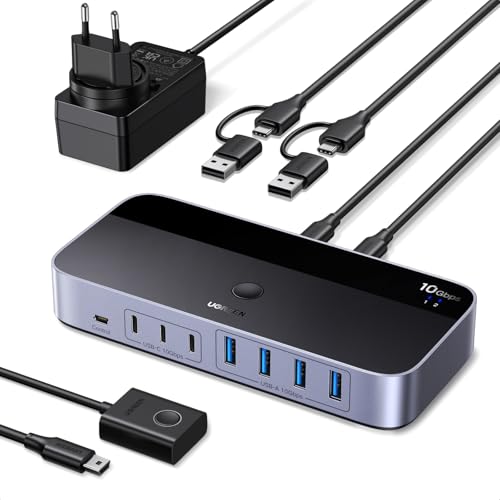
- Shares up to seven USB-A and USB-C devices
- USB 3.2 Gen 2 reaches up to 10Gbps
- Includes power adapter and USB-C-to-A cable
Best For: Large mixed-port setups needing fast USB data transfers
Best High-Speed Sharing
4-Port USB 3.0 Switch for Two Computers

- Four USB 3.0 ports with up to 5Gbps data transfer
- One-button switching with active-port LED
- Driver-free support for Windows, macOS, Chrome OS, and Linux
Best For: Sharing multiple USB peripherals across two computers
Best Simple Setup
2-in-2-Out USB Switch for Keyboard and Mouse

- Shares two USB devices between two computers
- Push-button control with an LED status indicator
- Includes two USB cables and needs no AC adapter
Best For: Straightforward keyboard and mouse sharing
Best Flexible Port Mix

- One USB-C and three USB-A sharing ports
- Up to 5Gbps USB 3.0 data transfer
- Switch using the device button or included controller
Best For: Mixed USB-C and USB-A peripherals on a dual-computer desk
Best Simple Two-Computer Pick – UGREEN 2-in-4 USB 2.0 Switch
For desktops that need to share several peripherals between two computers, this UGREEN model is a straightforward option among USB switch boxes for desktops. It connects up to four USB 2.0 devices and switches control with one button, without requiring drivers or network-sharing software. Note that it handles USB peripherals only, not monitors or video.
Best For: Two-computer workstations sharing a keyboard, mouse, printer, scanner, or storage devices.
Pros:
- Shares up to four USB devices between two computers.
- Includes two USB-A-to-A data cables.
- One-button switching, LED status indicator, and broad Windows, macOS, Linux, and Chrome OS compatibility.
Cons:
- USB 2.0 limits transfer speeds to the older standard.
- Does not support monitor or video transmission.
- Optional 5V power may be needed when using multiple or higher-power devices; charger is not included.
This is a practical, compact choice when your setup involves two computers and ordinary USB accessories. Buyers with USB-C-only computers should plan to use an adapter as directed by the manufacturer.
Best for Four Computers – SABRENT USB 2.0 Sharing Switch
The SABRENT USB-USS4 is designed for desktop environments where up to four computers need access to the same USB equipment. It uses a physical push button and separate LEDs to identify the selected computer, making it a useful fit for multi-system workspaces considering USB switch boxes for desktops.
Best For: Offices or workstations that share up to four USB devices across four computers.
Pros:
- Supports up to four computers and four USB devices.
- Push-button selection makes switching simple.
- LED indicators help distinguish the active computer, and additional devices can be added through USB hubs.
Cons:
- Uses USB 2.0, with data rates up to 480 Mbps.
- The supplied notes do not identify included connection cables.
- It is intended for USB peripheral sharing rather than monitor switching.
Choose this model when four-computer support is more important than newer USB speeds. Its hub-expandable design can also help accommodate a larger collection of peripherals.
Best Flexible Switching – DGODRT 4-in-4 USB 2.0 Switch
This DGODRT switch gives four computers access to four USB 2.0 peripherals and adds two ways to change the active system: buttons on the unit or a wired desktop controller. For anyone comparing USB switch boxes for desktops, that remote-style control can be convenient when the switch itself is out of reach.
Best For: Home, office, meeting, or school setups needing four-computer access with desktop-mounted switching control.
Pros:
- Supports four computers sharing four USB devices.
- Includes a wired desktop controller for convenient switching.
- Plug-and-play compatibility with Windows, macOS, Linux, and Chrome OS, with transfer rates up to 480 Mbps.
Cons:
- USB 2.0 is slower than USB 3.x alternatives.
- A 5V/1A power adapter is not included and may be needed for high-power devices such as hard drives.
- Designed for USB peripherals, not video or monitor sharing.
The included desktop controller distinguishes this model from basic push-button units. It is a sensible option for four-computer peripheral sharing when placement and convenient access matter.
Best USB 3.2 Upgrade – ATEN Essentials US5324 USB 3.2 Switch
The ATEN Essentials US5324 is the speed-focused choice in this group of USB switch boxes for desktops. It shares four USB peripherals between one USB-A computer and one USB-C computer, supports USB 3.2 Gen 1 speeds up to 5 Gbps, and offers both a built-in button and a remote port selector.
Best For: Two-computer users who need faster USB transfers and compatibility with both USB-A and USB-C systems.
Pros:
- USB 3.2 Gen 1 supports transfer rates up to 5 Gbps.
- Shares four peripherals between USB-A and USB-C computers.
- Includes a remote port selector, USB-C-to-A cable, and USB-C-to-C cable.
Cons:
- Supports two computers rather than four.
- Its higher-speed capabilities may be unnecessary for basic keyboards and mice.
- Compatibility is specified for computers with USB-A and USB-C connections.
For users moving large files or connecting faster USB accessories, the US5324 is the most capable option here. Its compact design and dual switching controls also suit a clean, modern desktop.
Compact Two-Computer Pick – 2-in-2-out USB 3.0 Switch
For shoppers comparing usb switch boxes for desktops, this compact 2-in-2-out model is a straightforward way to share one keyboard-and-mouse setup between two computers. Its USB 3.0 interface supports data rates up to 5Gbps, and the push-button design avoids software or driver installation.
Best For: Desktop users who need to share a keyboard and mouse between two computers while keeping setup simple.
Pros:
- Shares a keyboard and mouse between two computers.
- USB 3.0 supports data transfer speeds up to 5Gbps.
- Plug-and-play setup works across multiple operating systems.
- Included desktop controller makes switching convenient.
Cons:
- Provides two USB ports, so it is less suited to setups with several peripherals.
- Its plastic enclosure may feel less substantial than a metal switch.
This is a practical, no-frills choice when keyboard-and-mouse sharing is the priority. Consider a higher-port model if you also need to switch printers, scanners, storage, or other USB devices.
Four-Port Sharing Choice – BENFEI 2-in-4-out USB 3.0 Switch
Among usb switch boxes for desktops, the BENFEI 2-in-4-out switch is designed for users who need to share more than a keyboard and mouse. It connects four USB 3.0 peripherals to two computers, with a front switch and LED indicator for quick status checks.
Best For: Workstations that share keyboards, mice, printers, scanners, storage devices, or cameras between two computers.
Pros:
- Allows two computers to share four USB devices.
- USB 3.0 ports support transfer speeds up to 5Gbps and USB 2.0 backward compatibility.
- One-button switching and an LED indicator simplify operation.
- Supports Windows, macOS, Linux, and Chrome OS systems.
Cons:
- High-power devices may require a separate 5V power adapter, which is not included.
- Operation requires the specified USB A-to-USB A connection.
The BENFEI offers a useful balance of port capacity and simple switching for a mixed-peripheral desk. Its extra power input is valuable for demanding devices, but budget for an adapter if your setup needs it.
High-Speed Multi-Port Pick – UGREEN 2-in-7-out USB 3.2 Switch
For demanding desktop setups, the UGREEN 2-in-7-out model expands the typical usb switch boxes for desktops format with four USB-A and three USB-C ports. It supports USB 3.2 Gen 2 speeds up to 10Gbps, includes a USB-C-to-USB-A cable, and comes with a power adapter for high-power peripherals.
Best For: Users switching many USB-A and USB-C data devices between a modern computer and a legacy USB-A system.
Pros:
- Lets two computers share up to seven USB devices.
- Offers four USB-A and three USB-C ports.
- USB 3.2 Gen 2 supports transfer speeds up to 10Gbps.
- Includes a power adapter and USB-C-to-USB-A cable.
Cons:
- It is not a KVM switch and does not provide video output.
- USB ports are primarily intended for data; audio device connections are not recommended.
- Listed operating-system support begins with Windows 10 and macOS 10.15 Catalina.
This is the strongest fit for a large, mixed-port peripheral setup where fast file transfers matter. Its broader connectivity comes with an important limitation: it switches USB data devices only, not displays or video.
Best High-Speed Sharing – 4-Port USB 3.0 Switch for Two Computers
For desktops that need to share several peripherals, this four-port USB 3.0 switch is a practical option among USB switch boxes for desktops. It connects four USB devices to two computers, offers one-button switching, and includes two USB A-to-A cables.
Best For: Users sharing keyboards, mice, printers, scanners, webcams, or other USB peripherals between two computers.
Pros:
- Four USB 3.0 ports support data transfer speeds up to 5Gbps and are backward compatible with USB 2.0, 1.1, and 1.0.
- One-button switching and an LED indicator make the active computer easy to identify.
- Driver-free compatibility includes Windows, macOS, Chrome OS, and Linux.
- A 5V power port and included Type-C power cable can provide more stable operation for supported devices.
Cons:
- It does not support keyboard shortcuts for switching.
- The manufacturer notes that a computer’s available current may not support devices such as hard drives without additional power.
- It is a USB peripheral switch, not a video or monitor KVM.
This model suits a busy dual-computer desk where four shared USB connections and USB 3.0 performance matter. Its external power option adds flexibility, but storage-device compatibility should be checked before purchase.
Best Simple Setup – 2-in-2-Out USB Switch for Keyboard and Mouse
This compact two-in, two-out model is one of the simpler USB switch boxes for desktops. It lets two computers share two USB peripherals, uses a single push button with an LED indicator, and runs directly from the computers’ USB ports.
Best For: Basic keyboard-and-mouse sharing between a work computer and a personal laptop or desktop.
Pros:
- Supports two computers sharing two USB devices such as keyboards, mice, printers, scanners, or webcams.
- Push-button switching and an LED indicator provide straightforward operation.
- Driver-free compatibility covers Windows, macOS, Linux, and Chrome OS.
- Two USB cables are included, and no AC adapter is required.
Cons:
- It is not a KVM switch and does not transmit video or connect a monitor.
- The manufacturer does not recommend it for mass-storage devices such as hard drives or flash drives.
- Computers must be connected to the correct input ports, and USB-C-only computers may require a USB-C-to-A adapter.
Choose this switch when your setup only needs two shared USB devices and you want a small, uncomplicated controller. It is less suitable for storage-heavy workflows or display switching.
Best Flexible Port Mix – UGREEN 4-Port USB 3.0 Switch
UGREEN’s four-port switch is a flexible choice among USB switch boxes for desktops, combining one USB-C port with three USB-A ports. It lets two computers share four USB devices and provides both a built-in button and a remote controller for switching.
Best For: Desktops that need to share several mixed USB-C and USB-A peripherals while keeping the switch accessible or hidden.
Pros:
- One USB-C and three USB-A ports support four shared USB devices.
- USB 3.0 connectivity supports data transfer speeds up to 5Gbps and is backward compatible with USB 2.0.
- Controller and button switching options allow flexible desktop placement.
- An optional USB-C power connection can improve stability with higher-power devices and multiple peripherals.
Cons:
- It is not a KVM switch and does not support monitor or video transmission.
- The USB-C port does not support video output or connection to a display dock.
- Power may be needed when using multiple devices, and the ports are not recommended for charging.
This is a strong fit for a multi-peripheral workstation that values port variety and remote switching. Keep expectations focused on USB data sharing rather than display connectivity or device charging.
How We Picked the Best USB Switch Boxes for Desktops
We focused on the features that matter most in everyday desktop setups: computer and peripheral capacity, USB generation, connector compatibility, switching method, power requirements, and practical device support. The selection includes simple two-computer models, four-computer sharing switches, USB-A and USB-C options, and higher-speed choices for storage or other bandwidth-sensitive accessories.
Because product listings can vary by bundle, verify the included cables and host connections before ordering. A switch may support USB 3.0 or USB 3.2 speeds while still requiring separate cables, power, or compatible ports on both computers.
Quick Comparison
| Best For | Recommended Type | Why It Matters |
|---|---|---|
| Basic keyboard and mouse sharing | USB 2.0, 2-in/2-out | Affordable and sufficient for standard input devices |
| Sharing several peripherals | USB 2.0 or USB 3.0, 4-port | Supports devices such as printers, scanners, keyboards, and mice |
| Faster file transfers | USB 3.0 or USB 3.2 | Better throughput for external drives and fast accessories |
| Modern mixed-port desktops | USB-C and USB-A model | Improves compatibility across newer and older computers |
| Four-computer workspaces | 4-in/4-out switch | Lets one peripheral group serve more host systems |
Key Buying Factors for USB Switch Boxes for Desktops
Port Count and Switching Capacity
Check both sides of the specification: how many computers the switch supports and how many USB devices it can share. A two-computer, four-device model is suitable for a home office, while four-computer designs fit labs, test benches, and shared workstations.
USB Speed
USB 2.0 is usually enough for keyboards, mice, printers, and scanners. Choose USB 3.0 or USB 3.2 when you plan to share external storage, card readers, webcams, or other devices that benefit from higher bandwidth. The connected computers and peripherals must also support the advertised speed.
USB-A, USB-C, and Power
USB-A remains common on desktops, but USB-C host support can simplify newer PC and Mac setups. Confirm the port layout rather than relying on the product name. Some bus-powered switches work with low-draw peripherals, while power-hungry devices may need an externally powered hub or separate power supply.
Control Method and Compatibility
Physical buttons, desktop controllers, and LED indicators make it easier to identify the active computer. For reliable switching, check whether the model supports your operating systems and whether it is intended for USB peripherals only; most USB switches do not switch video like a full KVM.
Who Should Buy Which USB Switch Boxes for Desktops?
Choose a compact two-computer USB 2.0 switch if you mainly share a keyboard and mouse. Pick a four-port USB 3.0 model for a typical office setup with a printer, scanner, and other accessories. Users with newer USB-C computers should choose a mixed USB-C/USB-A option, while high-performance users should prioritize USB 3.0 or USB 3.2. For multiple desktops, a four-computer switch is the most convenient fit—provided its port count and switching controls match your workspace.