The best webcams for live streaming make it easier to look sharp, stay centered, and produce professional video without a complicated camera setup. This roundup compares 10 standout models across 4K and 1080p resolution, autofocus, AI tracking, microphones, and streaming-focused features.
Whether you stream games, teach online, host live events, or create content from a desk, the right webcam depends on your lighting, framing needs, computer setup, and budget. Use the guide below to narrow the options quickly.
Best 10 Webcams for Live Streaming Picks for 2026
Premium AI Tracking Pick

- 4K HDR video with a 1/2-inch sensor
- Physical AI pan-and-tilt tracking
- Noise cancellation and gesture controls
Best For: Mobile streamers and presenters seeking premium automated framing
Professional 4K Classic

- 4K video with up to 90 fps capture
- HDR lighting adjustment for difficult conditions
- Three field-of-view presets and 5x zoom
Best For: Desk-based streamers wanting flexible, high-resolution video
Flexible PTZ Value

- 4K video with 1080p at 60 fps
- Customizable AI tracking and preset positions
- Landscape, portrait, and upside-down modes
Best For: Streamers and presenters needing adaptable PTZ control
Everyday Streaming Favorite

- Full HD 1080p video at 30 fps
- Autofocus and automatic lighting adjustment
- Dual microphones and broad software compatibility
Best For: Beginners and casual streamers seeking reliable 1080p video
Best 4K Value

- 4K at 30fps or 1080p at 60fps
- PDAF autofocus with automatic light adjustment
- Privacy cover and noise-canceling microphones
Best For: Streamers and creators seeking sharp video with simple USB setup
Best for Fine-Tuned Video

- 4K at 30fps or 1080p at 60fps
- Manual controls plus AI image enhancements
- Show Mode and beamforming microphones
Best For: Streamers and professionals who want detailed image control
Best for Flexible Framing
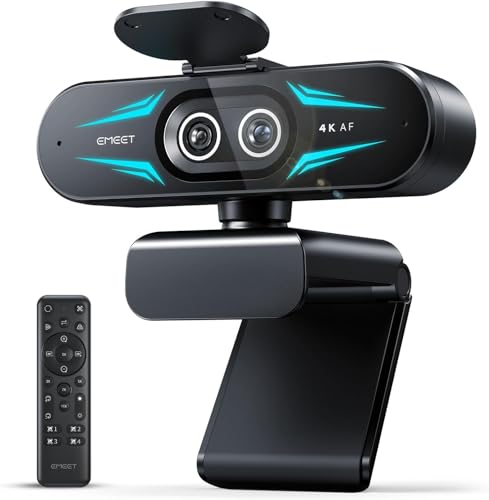
- Wide-angle and telephoto cameras in one unit
- Up to 11X hybrid zoom with PDAF autofocus
- Remote control, RGB lighting, and tripod support
Best For: Presenters and streamers needing wide and close-up views
Premium AI Streaming Pick

- 4K HDR video with a 1/2-inch sensor
- PDAF autofocus and AI auto framing
- Noise cancellation, gesture control, and creative modes
Best For: Streamers wanting premium 4K image quality and automation
Practical 4K Value

- 4K video at 30 fps with PDAF autofocus
- Dual microphones capture audio up to 8 feet away
- Privacy cover, swivel adjustments, and tripod support
Best For: Home offices, teaching, and straightforward 4K streaming
Smooth Full HD Streaming

- 1080p video at a smooth 60 fps
- Smart autofocus, auto-framing, and exposure control
- Landscape or portrait mounting with streaming software support
Best For: Gamers and creators prioritizing smooth Full HD streams
Premium AI Tracking Pick – Insta360 Link 2 4K PTZ Webcam
For shoppers seeking webcams for live streaming, the Insta360 Link 2 stands out with 4K video, a large 1/2-inch sensor, HDR, and PTZ movement. Its AI tracking, autofocus, and noise-canceling microphone make it a strong choice for creators who move around while presenting or streaming.
Best For: Mobile streamers, presenters, and creators who want premium image quality with automated framing.
Pros:
- 4K video, HDR, and a 1/2-inch sensor support detailed images in varied lighting.
- Physical pan-and-tilt AI tracking keeps moving subjects in frame.
- Includes PDAF autofocus, AI noise cancellation, gesture controls, and specialized DeskView and Whiteboard modes.
- Supports major platforms including Twitch, Zoom, and Microsoft Teams.
Cons:
- Not compatible with ARM-based Windows systems or Windows Hello Face Recognition.
- Advanced features require the Link Controller software.
The Link 2 is a feature-rich option for professional-looking streams, especially when movement and flexible framing matter. It is more camera than many stationary setups require, but its tracking and image controls can justify the upgrade for active creators.
Professional 4K Classic – Logitech BRIO 4K Webcam
The Logitech BRIO is a dependable 4K option for webcams for live streaming, with HDR, automatic light adjustment, and up to 90 fps capture. Its adjustable field of view and 5x HD zoom also make it practical for creators who want control over how much of their setup appears on camera.
Best For: Streamers, remote professionals, and creators who want sharp 4K video with flexible framing.
Pros:
- Ultra 4K resolution and 5x HD zoom provide detailed video and framing flexibility.
- RightLight 3 HDR helps manage low-light and backlit conditions.
- Offers 65°, 78°, and 90° field-of-view presets through Logi Tune.
- Includes dual noise-canceling microphones, a privacy shade, and Windows Hello support.
Cons:
- The listed model is identified as the older 2017 version.
- Its feature set may be more than needed for basic 1080p streaming.
BRIO remains a versatile choice when resolution, lighting assistance, and field-of-view control are priorities. It is particularly appealing for polished desk-based streams and video production where a fixed webcam is sufficient.
Flexible PTZ Value – OBSBOT Tiny 2 Lite 4K Webcam
The OBSBOT Tiny 2 Lite combines 4K video with AI tracking and PTZ movement, making it a capable option among webcams for live streaming. Multiple tracking modes, customizable presets, gesture zoom, and landscape or portrait shooting give streamers useful control without requiring constant manual adjustments.
Best For: Streamers, educators, and presenters who need customizable tracking and multiple shooting orientations.
Pros:
- Captures 4K at 30 fps and 1080p at 60 fps using a 1/2-inch CMOS sensor.
- Supports upper-body and hand tracking, plus customizable tracking and non-tracking areas.
- Preset positions can store separate parameters and tracking modes.
- Supports horizontal, portrait, and upside-down shooting modes with gesture control.
Cons:
- The Lite version omits whiteboard mode and voice control.
- Requires Windows 10 or later or macOS 11 or later.
Tiny 2 Lite is a practical middle ground for users who want PTZ automation without stepping up to a more feature-heavy model. Its presets and tracking customization are especially useful for repeatable presentations, lessons, and creator workflows.
Everyday Streaming Favorite – Logitech C920x HD Pro Webcam
The Logitech C920x is a straightforward choice for webcams for live streaming, delivering Full HD 1080p video at 30 fps with autofocus and automatic lighting adjustment. Its dual microphones and broad compatibility make it well suited to everyday streaming, calls, and recordings.
Best For: Beginners, casual streamers, and laptop users who want reliable 1080p video without advanced PTZ features.
Pros:
- Full HD 1080p video at 30 fps provides clear detail for streams and calls.
- Autofocus and automatic lighting adjustment help maintain a usable image.
- Dual microphones capture stereo audio for calls and recorded videos.
- Works with OBS, Zoom, Microsoft Teams, Skype, Google Meet, Windows, and macOS.
Cons:
- Limited to 1080p at 30 fps rather than 4K or 60 fps.
- Does not include a privacy shutter.
- Advanced capture features may require the included XSplit VCam software license.
The C920x is a sensible starting point for streaming setups that prioritize dependable performance and compatibility. It lacks the tracking and higher resolution of newer premium models, but its familiar plug-and-play design remains well suited to basic creator workflows.
Best 4K Value – EMEET S600
If you want webcams for live streaming with sharp detail and flexible frame rates, the EMEET S600 is a strong option. Its Sony 1/2.55-inch sensor supports 4K at 30fps or 1080p at 60fps, while PDAF autofocus and automatic light adjustment help maintain a clear image across changing scenes.
Best For: Aspiring streamers, gaming broadcasts, and creators who want high-resolution video with straightforward USB setup.
Pros:
- 4K at 30fps and 1080p at 60fps options
- PDAF autofocus is designed for fast, precise focusing
- Built-in privacy cover and dual noise-canceling microphones
- Adjustable field of view at 1080p and optional EMEETLINK customization
Cons:
- The field of view is fixed at 73 degrees in 4K mode
- Advanced customization requires EMEETLINK software
- Video resolution can depend on the camera software or app used
The S600 balances high-end image features with plug-and-play convenience. It is especially appealing if 4K detail, 60fps Full HD, and a built-in privacy cover matter more than specialized controls.
Best for Fine-Tuned Video – Logitech MX Brio
The Logitech MX Brio is a polished choice among webcams for live streaming, particularly for users who want detailed image controls. It records in 4K at 30fps or 1080p at 60fps and combines a larger-pixel sensor with AI-assisted exposure, white balance, autofocus, and noise reduction.
Best For: Streamers and remote professionals who want manual image adjustments, strong low-light assistance, and broad platform compatibility.
Pros:
- Ultra HD 4K at 30fps or 1080p at 60fps
- Manual controls for ISO, shutter speed, tint, and vibrance
- AI-enhanced face visibility and automatic image adjustments
- Dual beamforming microphones and Show Mode for desk sharing
Cons:
- It is heavier and larger than an ultra-compact webcam
- Some of its advanced controls may be unnecessary for basic streaming
- The supplied specifications list a one-year limited hardware warranty
MX Brio stands out when control and collaboration features are priorities. Its certified support for platforms including OBS, Streamlabs, Zoom, Teams, and Google Meet also makes it a versatile choice beyond livestreaming.
Best for Flexible Framing – EMEET C60E Dual-Camera
For webcams for live streaming that can shift from a wide scene to a close-up, the EMEET C60E offers an unusual dual-camera design. Its wide-angle and telephoto cameras support 4K clarity, while remote or EMEET STUDIO control enables framing adjustments without physically moving the webcam.
Best For: Product demonstrations, teaching, gaming streams, and presenters who need wide-angle and close-up views in one setup.
Pros:
- Dual wide-angle and telephoto cameras for flexible composition
- Up to 11X hybrid zoom with PDAF autofocus
- Remote control and EMEET STUDIO image adjustments
- RGB lighting, dual microphones, and 1/4-inch tripod support
Cons:
- Zoom is not supported in 4K, 60fps, or YUY2 modes
- The telephoto camera is recommended at a distance of 13.8 inches
- USB 2.0 Type-A connectivity may be less convenient for some setups
The C60E is more specialized than a typical single-camera webcam. Choose it if remote framing and presentation flexibility are central to your workflow; otherwise, a conventional 4K model may be simpler.
Premium AI Streaming Pick – Insta360 Link 2C
For shoppers seeking webcams for live streaming with premium image quality, the Insta360 Link 2C combines 4K video, a large 1/2-inch sensor, HDR, and fast PDAF autofocus. Its AI framing, noise-canceling microphone, and creative modes make it particularly versatile for streams, calls, and content creation.
Best For: Streamers and creators who want detailed 4K video, automated framing, and advanced software controls.
Pros:
- 4K video with HDR and improved low-light performance from a 1/2-inch sensor.
- PDAF autofocus helps maintain a sharp image during streams.
- AI noise cancellation, auto framing, gesture control, and smartphone control add flexibility.
- DeskView, Whiteboard, natural bokeh, and privacy features support varied setups.
Cons:
- Not currently compatible with ARM-based Windows systems or Windows Hello Face Recognition.
- Its advanced features may require the dedicated Link Controller software.
The Link 2C is the most feature-rich option here for creators who value 4K detail and intelligent shooting assistance. It is a strong fit for polished live streams, though buyers with simpler needs may not use all of its specialized controls.
Practical 4K Value – EMEET NOVA 4K Webcam
The EMEET NOVA is a practical choice among webcams for live streaming if you want 4K resolution, fast autofocus, and straightforward USB connectivity. Its dual microphones and privacy cover make it suitable for home offices, online teaching, meetings, and personal streams.
Best For: Buyers who want 4K video and clear built-in audio without wireless connectivity or complicated installation.
Pros:
- Captures 4K video at 30 fps with a CMOS sensor.
- PDAF autofocus and automatic light adjustment help maintain a clear image.
- Dual omnidirectional microphones capture voices from up to 8 feet away in suitable conditions.
- Includes a privacy cover, flexible swivel adjustments, and tripod compatibility.
Cons:
- Video defaults to 1080p and must be switched to 4K through compatible software or apps.
- It has a fixed 73-degree field of view and does not support facial tracking or manual focus.
- The USB 2.0 connection uses a Type-A port.
NOVA offers a strong balance of resolution, autofocus, audio, and privacy for the price-conscious buyer. Its fixed framing and software-dependent 4K setting make it less suited to users who need extensive camera control.
Smooth Full HD Streaming – Logitech StreamCam
The Logitech StreamCam is a dependable option among webcams for live streaming when smooth motion matters more than 4K resolution. It records Full HD 1080p at 60 fps and adds smart autofocus, auto-framing, intelligent exposure, and support for popular streaming software such as OBS and Streamlabs OBS.
Best For: Gamers, streamers, and video creators who want smooth 60 fps Full HD video with simple mounting and software support.
Pros:
- 1080p at 60 fps provides smooth motion for live streams and recordings.
- Premium glass lens, smart autofocus, auto-framing, and intelligent exposure support consistent video.
- Works with OBS, XSplit, Streamlabs OBS, Twitch, YouTube, and common video-call platforms.
- Supports landscape or portrait mounting on a monitor, laptop, or tripod.
Cons:
- Maximum video resolution is Full HD rather than 4K.
- Requires a USB-C connection and is designed for supported Windows or macOS systems.
- Advanced controls rely on Logitech Capture software.
StreamCam remains a sensible pick for creators who prioritize fluid 60 fps footage and an established streaming workflow. Choose another model if your content depends on 4K detail, but this webcam is well suited to gaming streams and everyday video production.
How We Picked the Best Webcams for Live Streaming
We focused on features that affect real-world streaming quality rather than resolution alone. Our selection includes cameras with 4K and Full HD capture, reliable autofocus, useful framing options, built-in microphones, and compatibility with common streaming and video-conferencing software. We also considered whether each model suits a particular type of creator, from beginners and remote workers to frequent live broadcasters.
AI tracking, PTZ movement, HDR, sensor size, frame rates, and software controls can make a meaningful difference, but they are not equally important for everyone. A dependable 1080p camera may be a better value than a premium 4K model if your lighting, upload bandwidth, or streaming platform limits image quality.
Quick Comparison
| Best For | What to Look For |
|---|---|
| Professional-looking streams | 4K capture, HDR, a larger sensor, and strong autofocus |
| Hands-free framing | AI tracking, auto framing, or PTZ movement |
| Budget streaming | 1080p at 30 or 60 fps and a dependable microphone |
| Wide desk or studio shots | Wide-angle coverage or dual-camera flexibility |
| Low-light rooms | A larger sensor, HDR, exposure controls, and better lighting |
Key Buying Factors for Webcams for Live Streaming
Resolution and Frame Rate
4K provides extra detail and flexibility for cropping, but it uses more processing power and bandwidth. Full HD remains sufficient for many Twitch, YouTube, meeting, and social broadcasts. If your content includes fast movement, prioritize 60 fps where available; for talking-head streams, 30 fps is often adequate.
Autofocus, Tracking, and Framing
Fast autofocus helps when you hold products or move around. AI tracking and auto framing are especially useful for presenters, instructors, and creators who do not want to remain fixed in one position. PTZ models offer more control, while fixed webcams are typically simpler and less expensive.
Audio, Lighting, and Connectivity
Built-in microphones are convenient, but a dedicated USB microphone usually delivers better sound for serious streaming. Look for HDR or exposure controls if your room has uneven lighting, and check USB requirements, mounting options, privacy features, and compatibility with your operating system and streaming software.
Who Should Buy Which Webcams for Live Streaming?
Choose a 4K AI-Tracking Model
Choose a PTZ or AI-tracking webcam if you present, teach, demonstrate products, or move around during broadcasts. These cameras can reduce manual adjustments and create a more polished appearance.
Choose a Traditional 4K Webcam
A fixed 4K webcam is a strong choice for creators who want detailed video, crop flexibility, and a straightforward desk setup without paying for motorized tracking.
Choose a 1080p Webcam
Buy a Full HD model if you are starting out, stream mainly from a stable seated position, or want to keep costs and computer demands low. Put the savings toward lighting or a better microphone, which can improve the finished stream as much as a resolution upgrade.